Organize When You Need To. Pause When You Don’t.
Only plan a few events a year? Pause your monthly SameTeam Events plan for 1–6 months, keep every event and response, and pick back up automatically when your next event comes around.
Monthly plans · 1–6 months at a time · Restarts automatically
Not every organization plans events every month. A PTO might run a fall festival and a spring carnival. A church might plan a summer program and a Christmas outreach, with a few quiet months in between. A nonprofit might hold one big volunteer day each season.
Paying for event software during the quiet months doesn’t make much sense, but canceling and starting over every time isn’t great either. That’s why SameTeam Events monthly plans can pause between events: billing stops, your events and responses stay saved, and your plan restarts automatically on the date you choose.
Quick answer: To pause your SameTeam Events subscription, go to Plans & Billing and select Pause your plan. Choose when your break starts (your next renewal or a later one) and how long it lasts (1–6 months), review the details, and select Schedule my break. You aren’t charged while paused, and billing restarts automatically on your restart date. Pausing is available on monthly plans only.
Who can pause
- Monthly Organizer and Pro plans can pause, as often as you need.
- Annual plans can’t pause. They already cost less per month and work best for organizations that plan events all year.
- Your first free event isn’t a subscription, so there’s nothing to pause, and a break doesn’t affect it.
Comparing options? See monthly and annual pricing.
How to pause your plan (step by step)
1. Open Plans & Billing
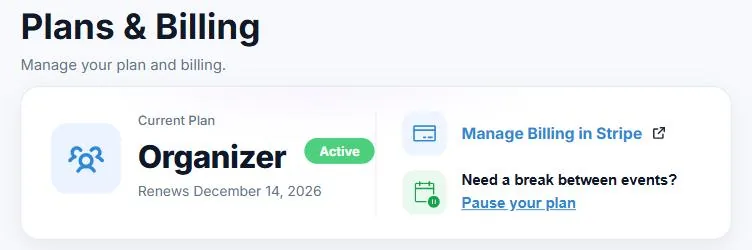
Sign in to SameTeam Events and select Plans. In your Current Plan card, under Need a break between events?, select Pause your plan.
2. Choose when your break starts
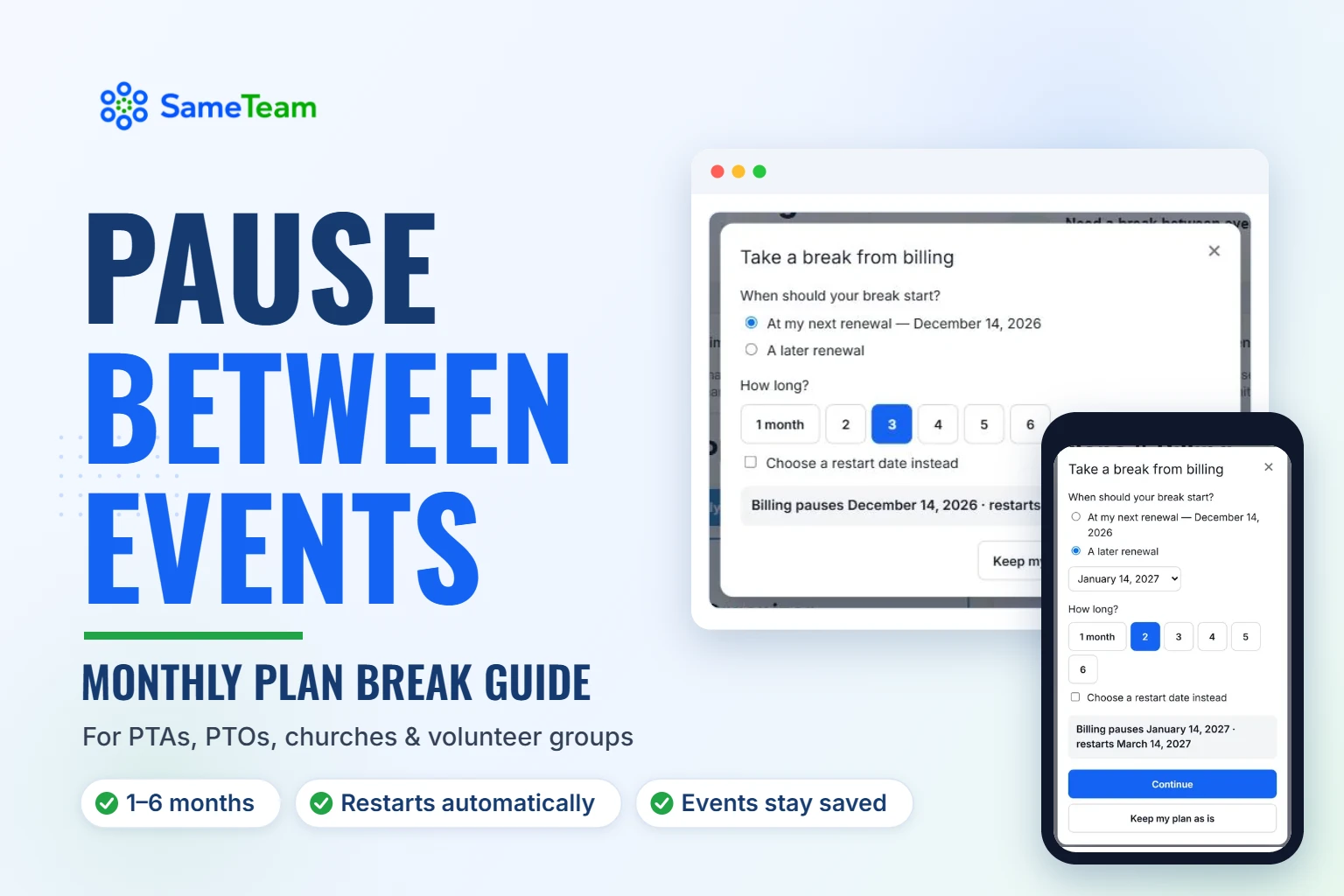
Pick At my next renewal or A later renewal. Breaks always start on a renewal date, so you keep all the time you’ve already paid for.
3. Choose how long
Select 1 to 6 months, or check Choose a restart date instead to pick an exact date. The summary at the bottom shows when billing pauses and when it restarts.
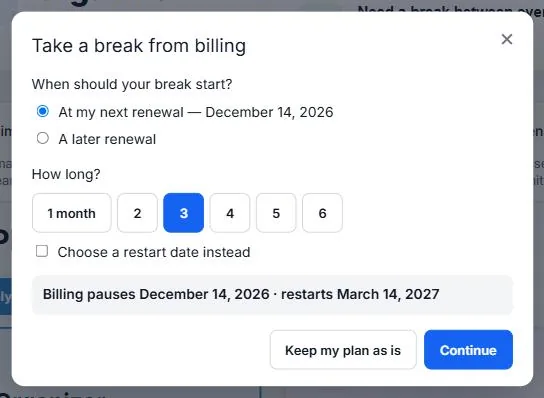
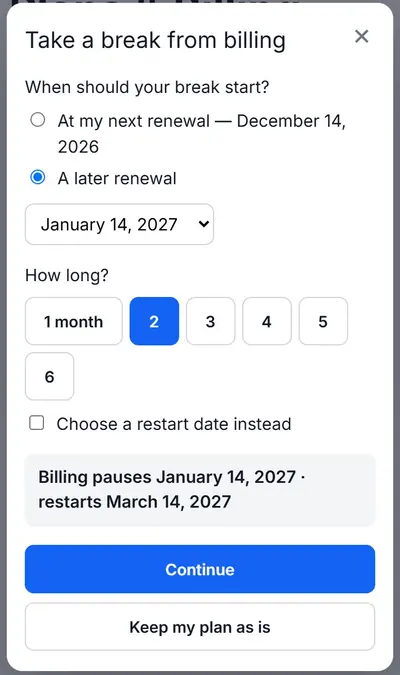
4. Review and schedule your break
Before anything is scheduled, you’ll see exactly what happens: when your plan stays active until, when billing pauses, the restart date and amount, and when we’ll send your reminder. Check the box to confirm you understand your plan restarts automatically, then select Schedule my break.
5. Watch your inbox
You’ll get an email confirming your break, another when it starts, and a reminder 7 days before your plan restarts.
What happens while your plan is paused
| When | What happens |
|---|---|
| Before your break starts | Your plan works normally. You can change your dates or cancel the break. |
| Your break starts | Billing pauses. You won’t be charged while paused. |
| First 14 days of your break | Guests can keep responding. Events already underway can keep going until they end, for up to 30 days. |
| After 14 days | Events that start later, or have no date, pause for guests. Event Hubs pause too. Everything stays saved, and you can still view and export responses. |
| 7 days before restart | We email you a reminder with the date and amount. |
| Restart day | Your plan restarts and your card on file is charged your regular monthly price. Events that were paused during your break reopen automatically. |
A few more details:
- Nothing is deleted. Your events, guest responses, signups and settings stay in your account.
- Events you ended or canceled yourself stay that way. Only events that were paused because of your break reopen.
- Ready for a new event during your break? Restart your plan from Plans & Billing to create and publish new events.
- Using Admins on Pro? While your plan is paused, Admins can’t manage your events. Their access comes back automatically when your plan restarts.
- Guests never see billing details. A paused event simply shows that it isn’t available right now.
Changing your mind
- Before your break starts: change your dates or cancel the break from Plans & Billing. If you cancel it, your plan simply continues as usual.
- During your break: change your restart date (up to 6 months after your break started) or restart early. Restarting early charges your card that day and starts a new monthly billing period.
- If a restart payment doesn’t go through: your plan stays paused and you aren’t charged. We’ll email you so you can confirm the payment or update your card, then restart.
Should you pause or cancel?
| Pause | Cancel | |
|---|---|---|
| Best for | Taking a break between events | Stopping for the foreseeable future |
| Billing | Stops during the break, then restarts on your date | Stops at the end of your billing period |
| Coming back | Automatic, or restart early anytime | Resubscribe whenever you’re ready |
| Your events and responses | Saved | Saved |
| Available on | Monthly plans | Monthly and annual plans |
If you think you’ll be back, pausing is usually easier: there’s nothing to remember, and your restart is already scheduled.
Planning a year with only a few events
Here’s how organizations with an occasional event calendar often use a monthly plan with pauses:
- PTA or PTO: active August through October for back-to-school night and the fall festival, paused over the winter, active again in spring for the book fair and field day. See how PTAs use SameTeam.
- Church ministry: active for the months leading up to a summer program or a holiday outreach, paused in between. See church event planning.
- Nonprofit or community group: active around a volunteer day or annual fundraiser, paused the rest of the year.
Timing tip: Set your restart date a few weeks before you need to share your next event, so you have time to set it up. You can always restart early if plans change.
When you’re back, use Duplicate Event to copy last year’s signup list or volunteer roles, then add new dates. For ideas, see how to make a sign up sheet with time slots.
Only organize a few events a year?
Start with one free event. If you need more, choose a monthly plan and pause between events whenever you’re not using it.
Create Your First Event Free →
No guest accounts · No app downloads · No ads
Frequently asked questions about pausing your plan
Can I pause an annual plan?
No. Pausing is available on monthly Organizer and Pro plans. Annual plans cost less per month and are best for organizations that plan events throughout the year.
How many times can I pause?
As often as you need. Each break can last 1 to 6 months.
Will I be charged while my plan is paused?
No. Billing stops when your break starts. On your restart date, your card on file is charged your regular monthly price, and we email you a reminder 7 days before.
What do guests see while I’m paused?
For the first 14 days, guests can keep responding, and events already underway can continue until they end (up to 30 days). After that, other events and Event Hubs pause and show that they aren’t available right now. Guests never see anything about your billing.
Can I restart early?
Yes. Choose Restart now in Plans & Billing anytime during your break. You’re charged that day and a new monthly billing period begins.
Can I change or cancel a scheduled break?
Yes. Before your break starts, you can change the dates or cancel it, and your plan continues as usual. After it starts, you can change your restart date or restart early.
Do I lose my events or responses?
No. Everything stays saved, and you can view and export responses anytime. Events paused during your break reopen automatically when your plan restarts.
What if my card fails when my plan restarts?
Your plan stays paused and you aren’t charged. We’ll email you so you can confirm the payment or update your card in Plans & Billing, then restart.
Bottom line: if your events come in seasons or just a few times a year, a monthly plan with pauses lets you pay for SameTeam Events when you’re organizing and stop paying when you’re not.
Handing your events to a new leader instead? See how to transfer event ownership to a new organizer. Or create your first SameTeam event free →