
Event RSVP Software That Makes Responses Simple
Create your event, share one simple link, and collect Yes, Maybe, and No responses in one organized place. SameTeam is an online RSVP tool that helps you track party sizes, guest notes, capacity, deadlines, and reminders—without guest accounts, app downloads, or ads.
✓ No Guest Accounts
✓ No App Downloads
Collecting RSVPs shouldn’t mean chasing people for answers.
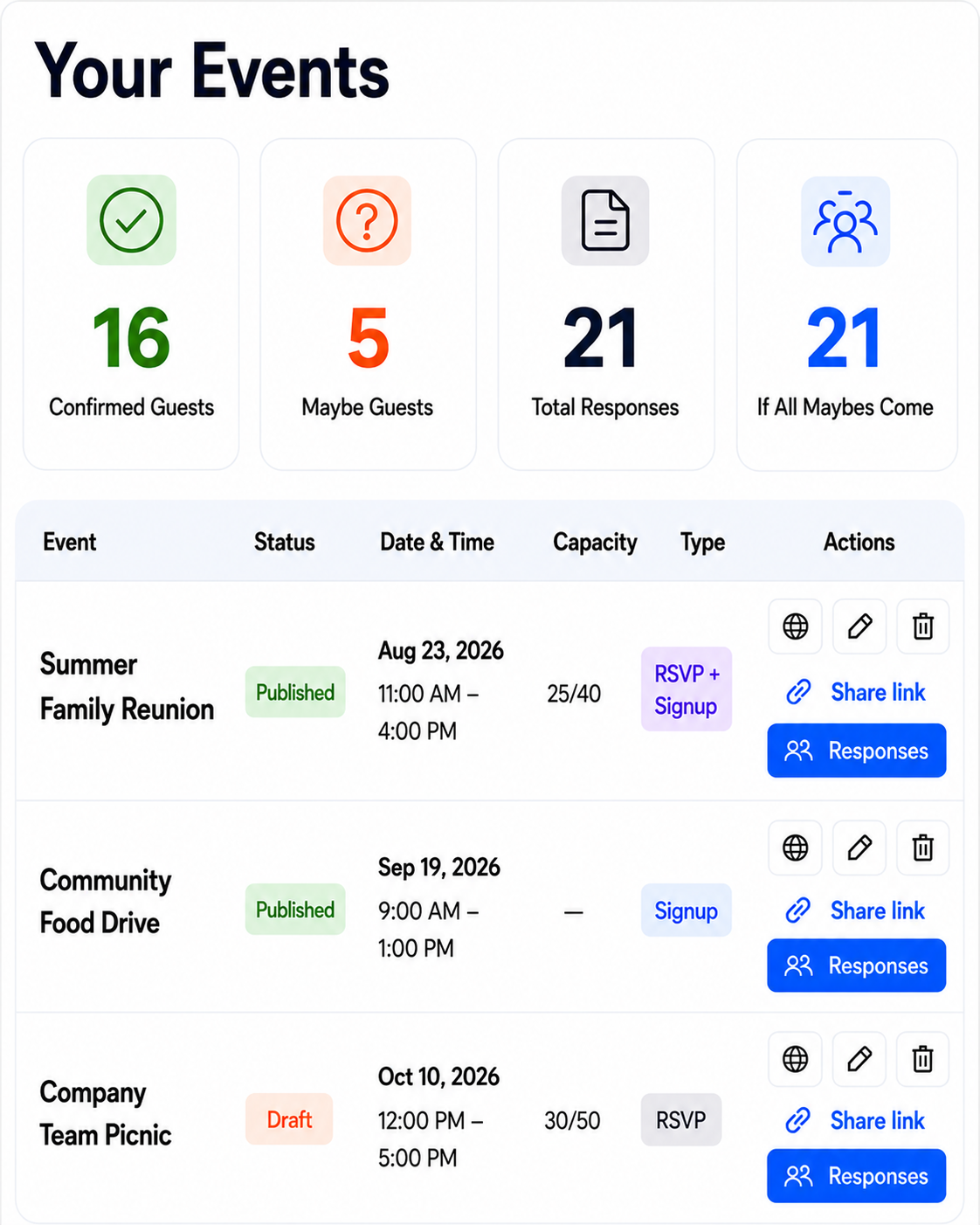
Give guests one easy RSVP link and give yourself one organized dashboard for responses, party sizes, notes, deadlines, reminders, and event updates. Your RSVP website stays simple for guests and organized for you.
Know Who’s Coming Without the Back-and-Forth
SameTeam gives you a simple RSVP website for collecting responses and keeping attendance organized from the first reply through event day.
Clear Yes, Maybe & No Responses
Guests respond in seconds. You see every answer together instead of piecing together texts, emails, and group-chat replies.
Party Size & Guest Notes
Collect party size along with helpful notes so you have a clearer headcount and the details you need to prepare.
Capacity, Deadlines & Reminders
Set an event capacity and RSVP deadline, then send unlimited reminders from your organizer dashboard as the date gets closer.
Start With RSVPs. Add Signups When You Need Them.Start With RSVPs. Add Signups When You Need Them.
Create a simple RSVP-only event, a signup sheet, or combine RSVPs and signups in one event.Create a simple RSVP-only event, a signup sheet, or combine RSVPs and signups in one event.
Collect RSVPs without chasing replies.
Guests choose Yes, Maybe, or No, add their party size, and update their response from their personal link.
Make volunteer and item signups easy to understand.
Show available shifts, roles, food, supplies, and quantities so participants can choose exactly how they want to help.
Connect attendance and signups in one event.
Guests can RSVP and choose volunteer shifts, food, or supplies from the same link—without creating an account.
How It Works
Create your event, share one link or QR code, collect RSVPs, and send reminders as the date gets closer.
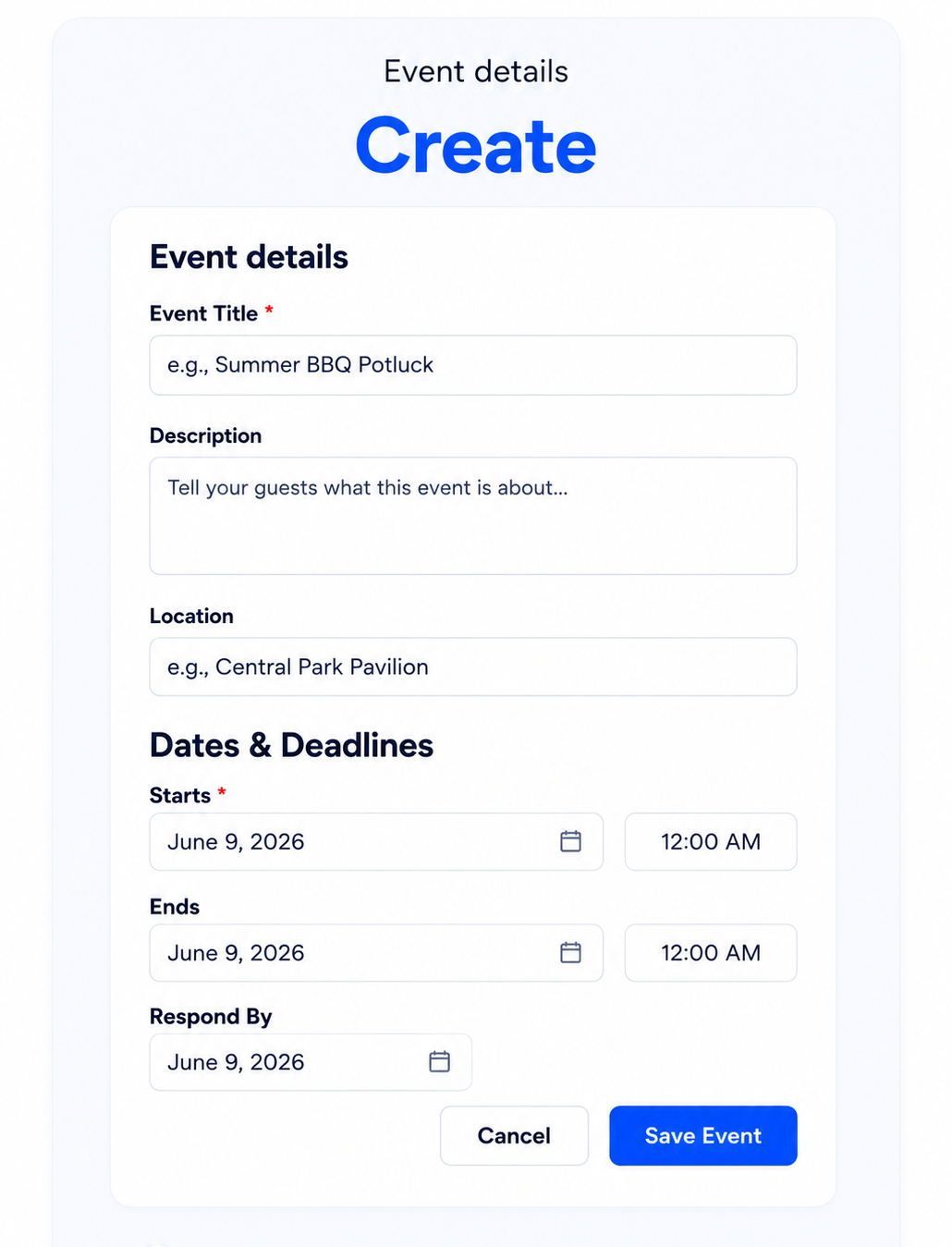
1 Create Your Event
Add your event details, RSVP choices, capacity, response deadline, and anything guests should know.
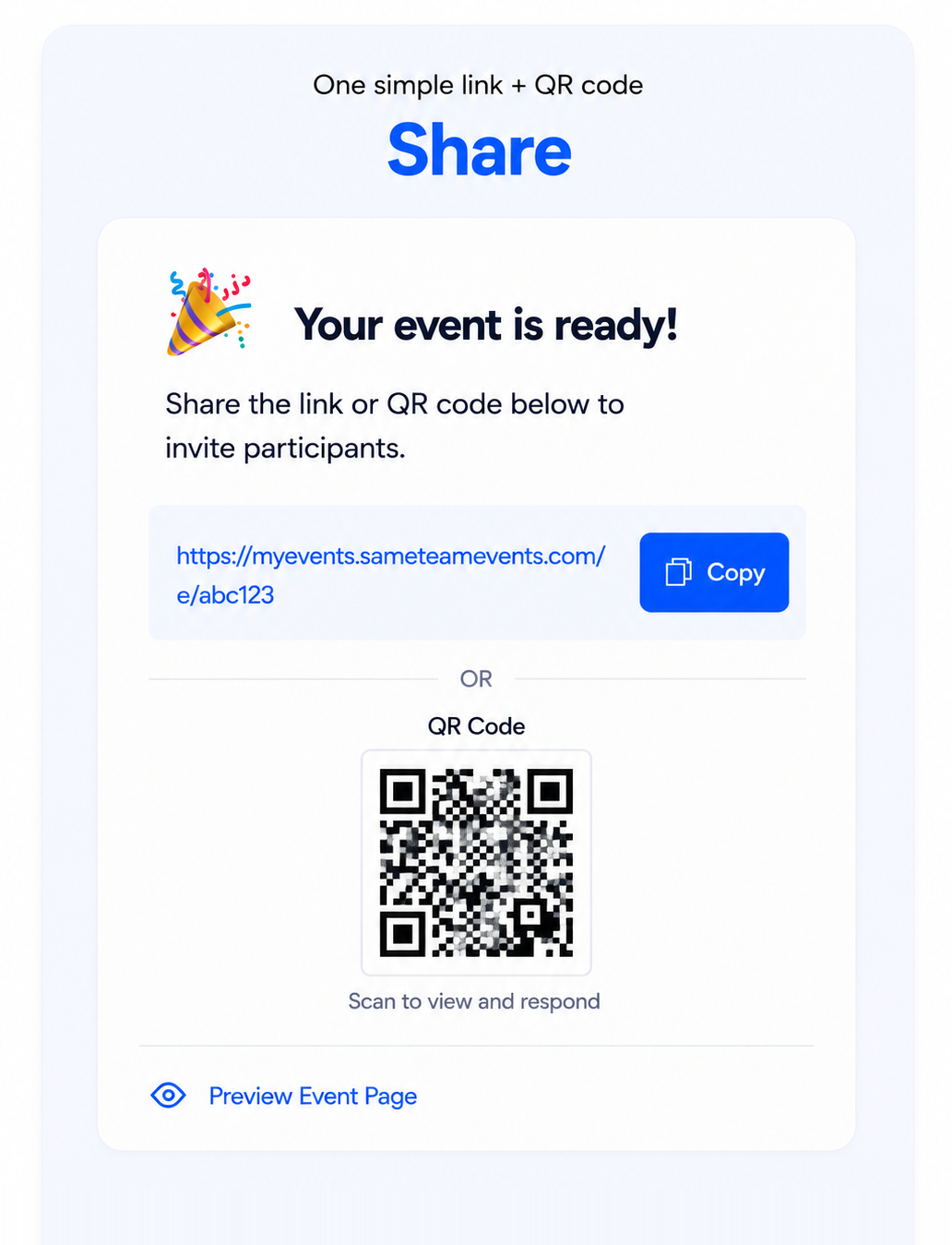
2 Share One Link
Share it by email, text, newsletter, social media, or QR code. Guests respond without accounts or app downloads.
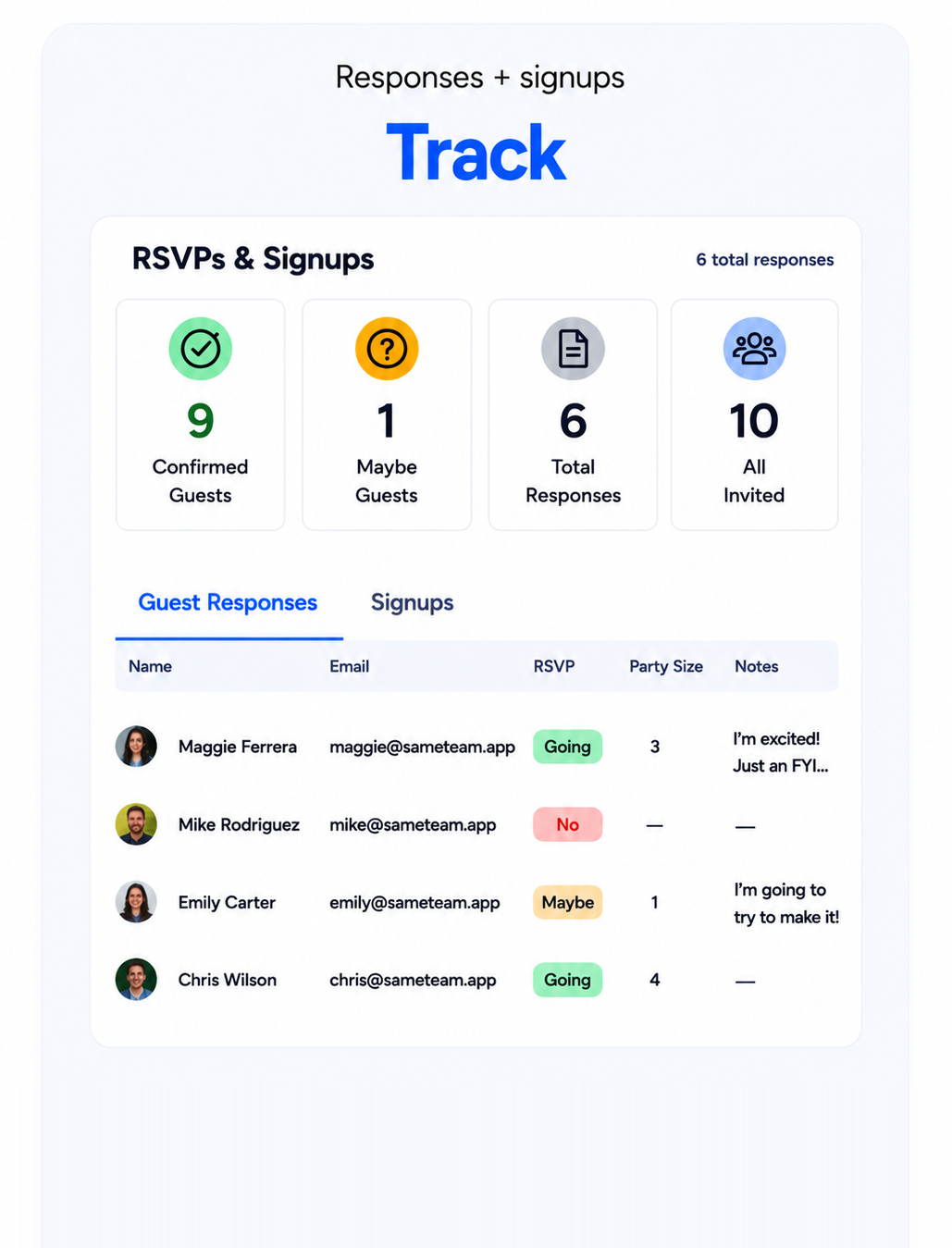
3 Collect, Remind & Show Up
Track Yes, Maybe, and No responses, party sizes, and notes from your private dashboard, then send unlimited reminders as the event gets closer.
One RSVP dashboard for you. One simple link for your guests.
Track responses, party sizes, guest notes, reminders, and updates in one place—without requiring participants to create accounts or download an app.
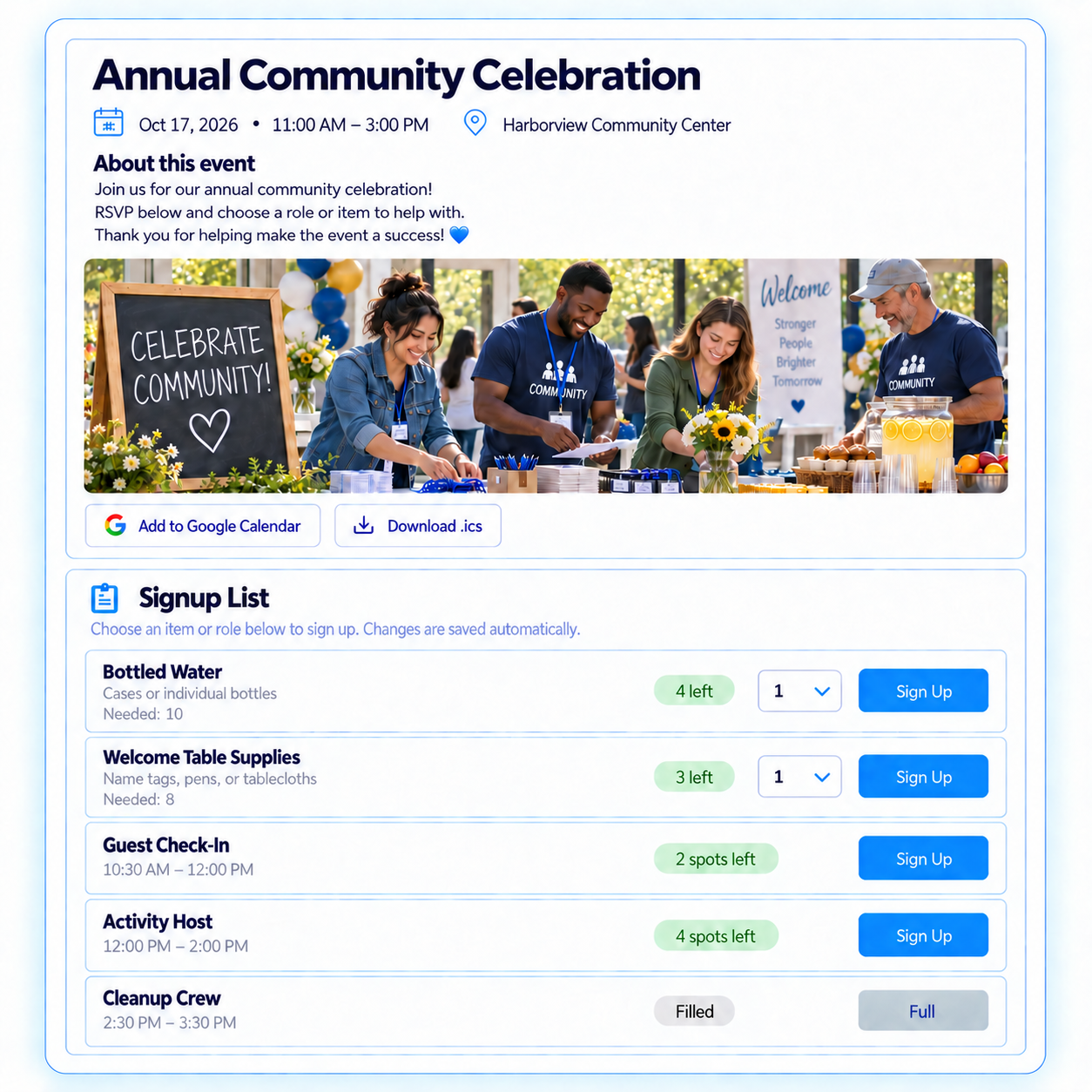
Stay on top of every detail
- Track Yes, Maybe, and No responses, party sizes, and notes
- Add an event image; set capacity and response deadlines
- See responses, party sizes, guest notes, and attendance details together
- Set event capacity and a response deadline
- Send unlimited reminders from your private dashboard
Simple from the first click
- RSVP Yes, Maybe, or No from one link
- No accounts or app downloads
- Receive a confirmation email and personal update page
- Add the event to their calendar
- No ads, and contact information isn’t public
Ready to stop chasing RSVPs? Create your first RSVP event free—no credit card required.
RSVP software for the groups you bring togetherRSVPs for every kind of group
Collect attendance for church gatherings, school events, nonprofit programs, team activities, neighborhood events, and community celebrations.One easy RSVP link for your next event.
HOAs & Communities
Plan neighborhood events, festivals, cleanups, meetings, and community programs.
Events, cleanups & programs
Sports & Teams
Coordinate team meals, banquets, snack schedules, carpools, and volunteer coverage.
Meals, schedules & volunteers
Simple Pricing
Your first event is free. Guests and volunteers always participate for free.
Unlimited events. Unlimited participants. Unlimited reminders.
Create and manage events all year long. Cancel anytime.
Organizer
Everything you need to organize events all year long.
- Unlimited events
- Unlimited participants
Pro
Additional tools for organizations managing more.
- Everything in Organizer
- Event Hub — one page for multiple events
Event RSVP Software FAQs
Common questions about collecting and managing online RSVPs with SameTeam.
What is event RSVP software?
Event RSVP software gives organizers an online way to collect and manage attendance responses. SameTeam works as an online RSVP tool and RSVP website: guests open one event link, choose Yes, Maybe, or No, and can include their party size or a note. Organizers track responses from a private dashboard and can send reminders as the event approaches.
Do guests need an account or app to RSVP?
No. Guests can RSVP directly from the event link without creating a SameTeam account, downloading an app, or remembering a password.
Can guests update their RSVP later?
Yes. Each participant receives a confirmation email with a personal page where they can review or update their response before your deadline.
Can I collect party size and guest notes?
Yes. SameTeam can collect party size with an RSVP, and guests can add a note for the organizer.
Can I set an RSVP deadline or event capacity?
Yes. Organizers can set a response deadline and an event capacity. Capacity applies to attending guests while Maybe and No responses can still be collected.
Can I send RSVP reminders?
Yes. Organizers can send unlimited reminders from their private dashboard as the event gets closer.
Can I use SameTeam for RSVPs and signups together?
Yes. If your event also needs volunteer shifts, roles, food, or supplies, you can combine RSVPs and signups on the same event page. You can also create an RSVP-only event when attendance is all you need.
What kinds of events can use SameTeam for RSVPs?
SameTeam works for church gatherings, PTA and school events, nonprofit programs, team activities, HOA and neighborhood events, potlucks, classes, meetings, celebrations, and other group events.
How much does SameTeam cost?
Your first event is free with no credit card required. Paid plans include unlimited events and unlimited participants, with Organizer starting at $15 per month.
Ready to make RSVPs easier?
Create an RSVP page in minutes, share one simple link, and keep every response organized. Your first event is free.
SameTeam is family-owned and built alongside the organizers who use it.