Plan Every Class Party Without the Group-Text Chaos
List the treats, supplies, and helpers your class needs, set how many of each, and share one link with families. Here’s how to build a class party sign up sheet, plus ready-to-copy lists for Halloween, winter, Valentine’s Day, and end-of-year parties.
Practical steps · Copy-ready party lists · Tips from room parents
You volunteered to be room parent, and the first party is three weeks away. You send a note home asking who can bring snacks. Five families offer cupcakes, nobody offers napkins, two parents want to help with the craft, and you’re still not sure who’s bringing juice.
A class party sign up sheet fixes that. You list exactly what the class needs, like 24 cupcakes, 2 fruit trays, plates and napkins, and 2 craft helpers, and families claim what they can. When something is covered, it shows as full, so the next parent picks something that still needs help.
Quick answer: To make a class party sign up sheet, check with the teacher first, then list each food, supply, and helper role as its own item with the number you need. Group them into categories like Food & Drinks, Party Supplies, and Party Helpers, and add a date and time to helper roles. Share one link with families so they can sign up from their phones. In SameTeam, food and supply items let parents choose how many they’ll bring, and helper roles use One person per spot.
What to put on a class party sign up sheet
Most class parties need the same three kinds of help. Thinking in these groups keeps your list short and easy to scan:
- Food and drinks, like cupcakes or cookies, a fruit tray, a veggie tray, and juice boxes or water
- Party supplies, like plates, napkins, cups, craft materials, and game prizes
- Party helpers, like a craft station helper, a game leader, a photographer, and someone to stay for cleanup
For food and supplies, set the total you need and let families choose how many they’ll bring. One parent might bring 12 cupcakes and another the other 12. For helpers, set the number of people you need and when, so you don’t end up with six adults at the craft table and nobody at cleanup.
Before you build the list, ask the teacher three things: how many students are in the class, the school’s food rules (many schools require store-bought or nut-free treats), and whether parent helpers need to check in at the office. Put the answers in your event description so every family sees them.
How to make a class party sign up sheet in SameTeam (6 steps)
Here’s the setup we used for a sample Valentine’s Day party for a second-grade class of 24. It takes about 10 minutes.
1. Create your event and choose a signup list
Click Create Event and add a clear title, like “Valentine’s Day Class Party – Mrs. Lopez’s 2nd Grade,” plus the date, time, and classroom. Under What do you need?, check Add a signup list. Use the description for the details every family needs: food rules, the drop-off time, and where to bring items. For example: “Our class is nut-free, so please choose store-bought, nut-free treats. Drop off items in the front office by 9:00 AM on party day.”
2. Add categories for food, supplies, and helpers
In the signup items window, open Categories (optional) and add your groups, such as Food & Drinks, Party Supplies, and Party Helpers. Categories show as headings on the signup page, so parents can quickly find something they’re comfortable bringing or doing.
3. Add food and supply items with the total you need
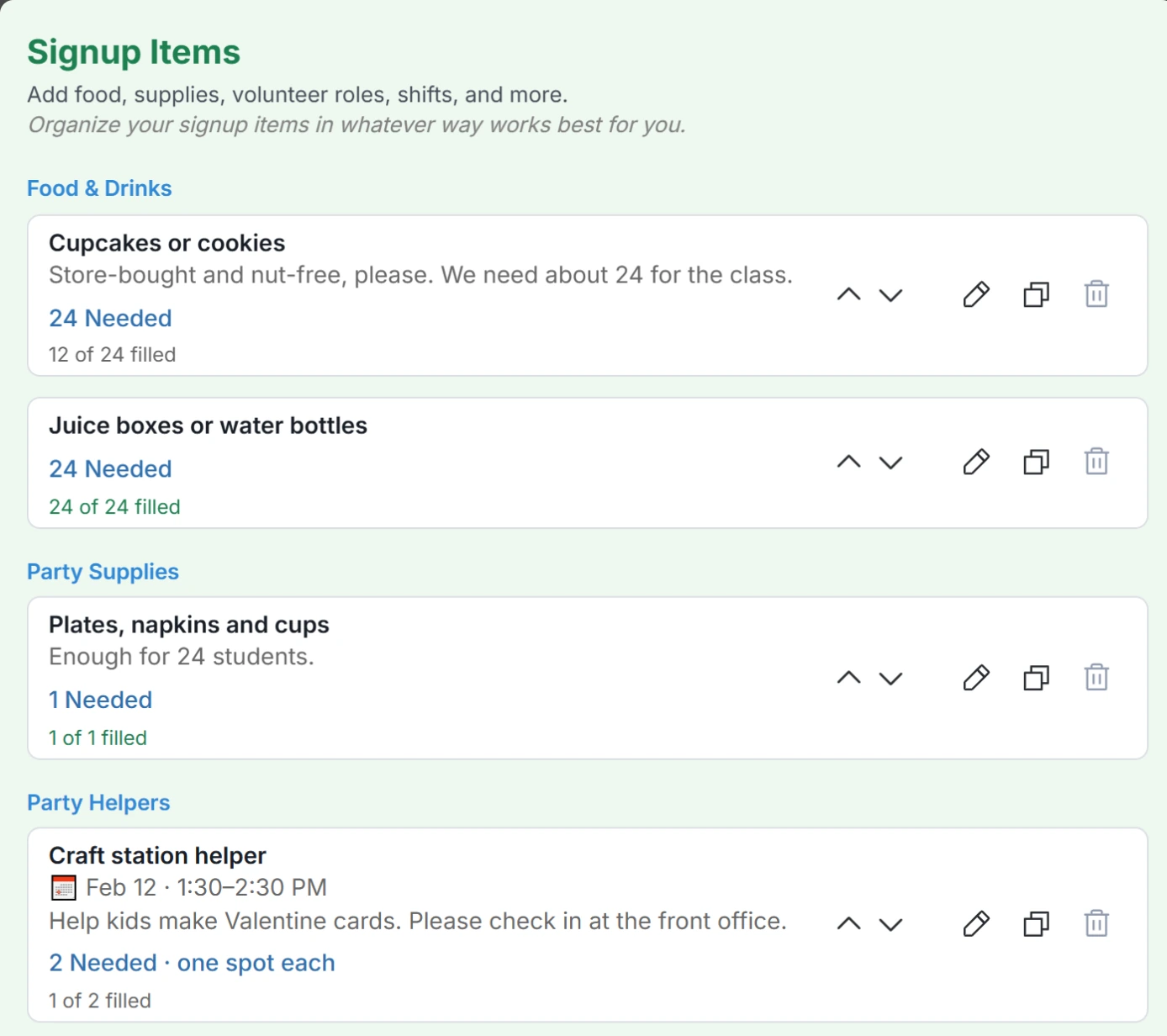
In Item or Role, enter the item, like “Cupcakes or cookies,” and choose its category. Use Details (optional) for anything specific, like “Store-bought and nut-free, please.” In Number Needed, enter the total for the class, like 24. Leave One person per spot unchecked so each parent can choose how many they’ll bring. Click Add Item, then repeat for each food and supply item.
4. Add helper roles with a time
For in-class helpers, enter the role, like “Craft station helper,” and check One person per spot (no quantity selection). The field changes to Spots Needed, where you enter how many helpers you want. Open Date & time (optional) to set the start and end time, such as 1:30–2:30 PM for crafts and 2:30–3:00 PM for cleanup. If the date is left blank, it uses the event date.
Save time: click the duplicate icon on any item to copy it, then change only what’s different, such as the name, time, or number needed. Click Save Changes when your list is done.
5. Ask for the child’s name
Parents sign up under their own names, which can make it hard to match families to students. Under Guest questions, add a Short answer question like “Your child’s name,” check Required, and click Save Question. Parents answer it when they sign up, and you see the answers in your guest details and in your spreadsheet download (CSV). Other families don’t see them.
6. Share the link and track what’s covered
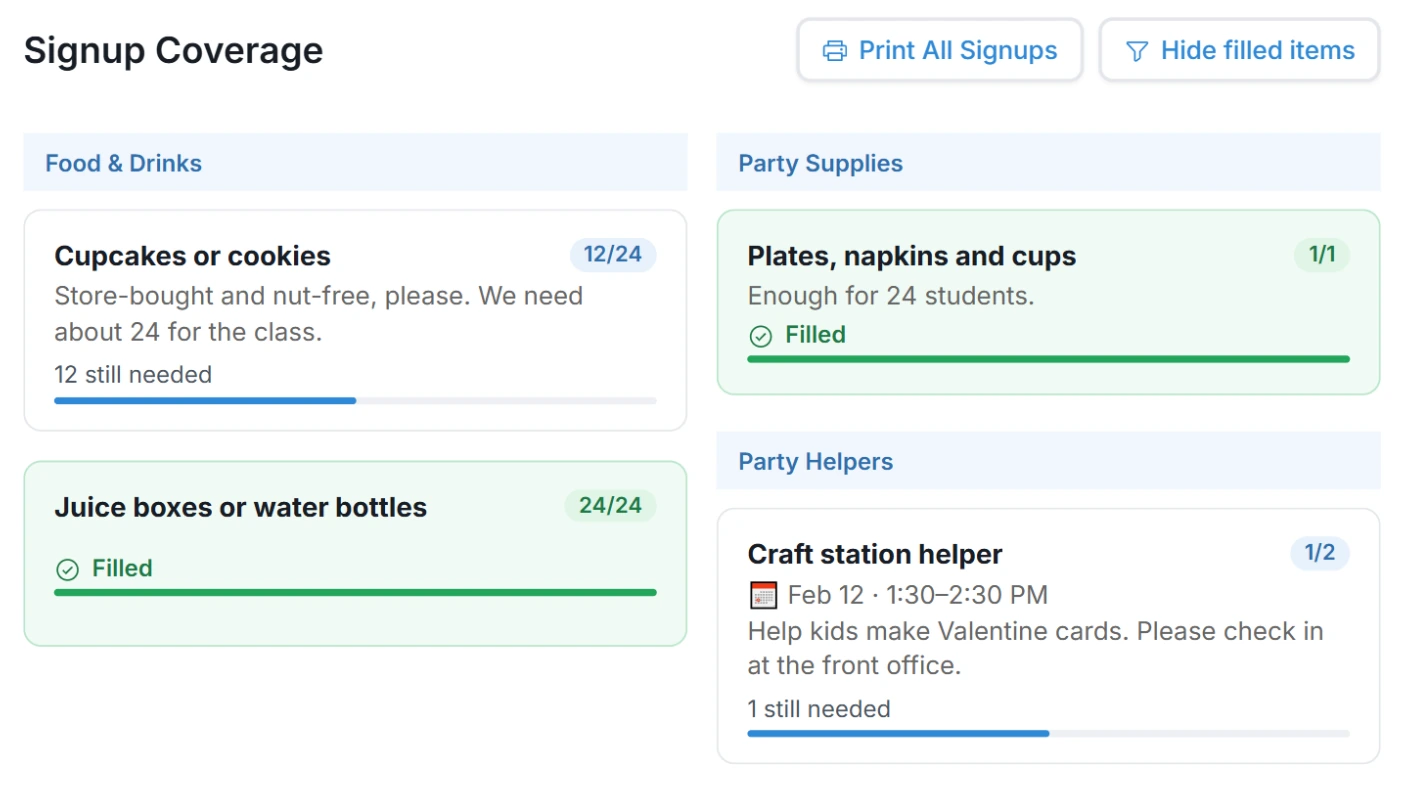
Copy your event’s share link and send it however the class already communicates, such as the teacher’s newsletter, a class email, or the school messaging app. Then open Responses and scroll to Signup Coverage to see what’s filled and what’s still needed. Use Hide filled items to see only the gaps, or Print All Signups for a sheet to bring to the party.
What parents see when they sign up
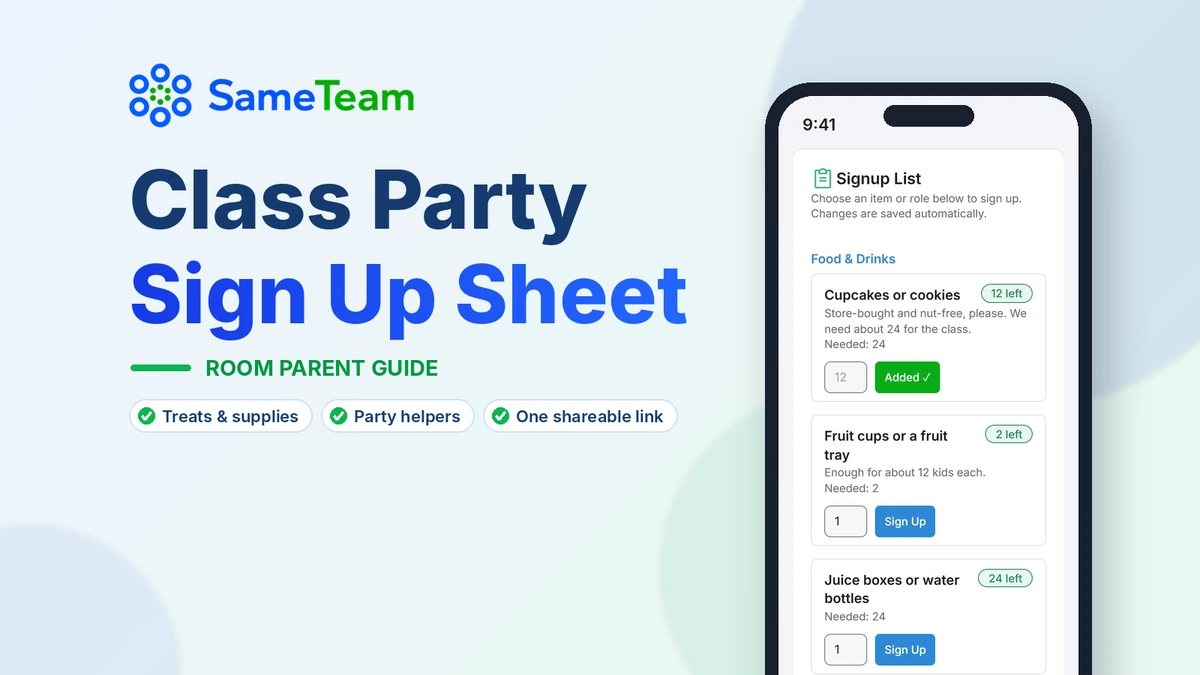
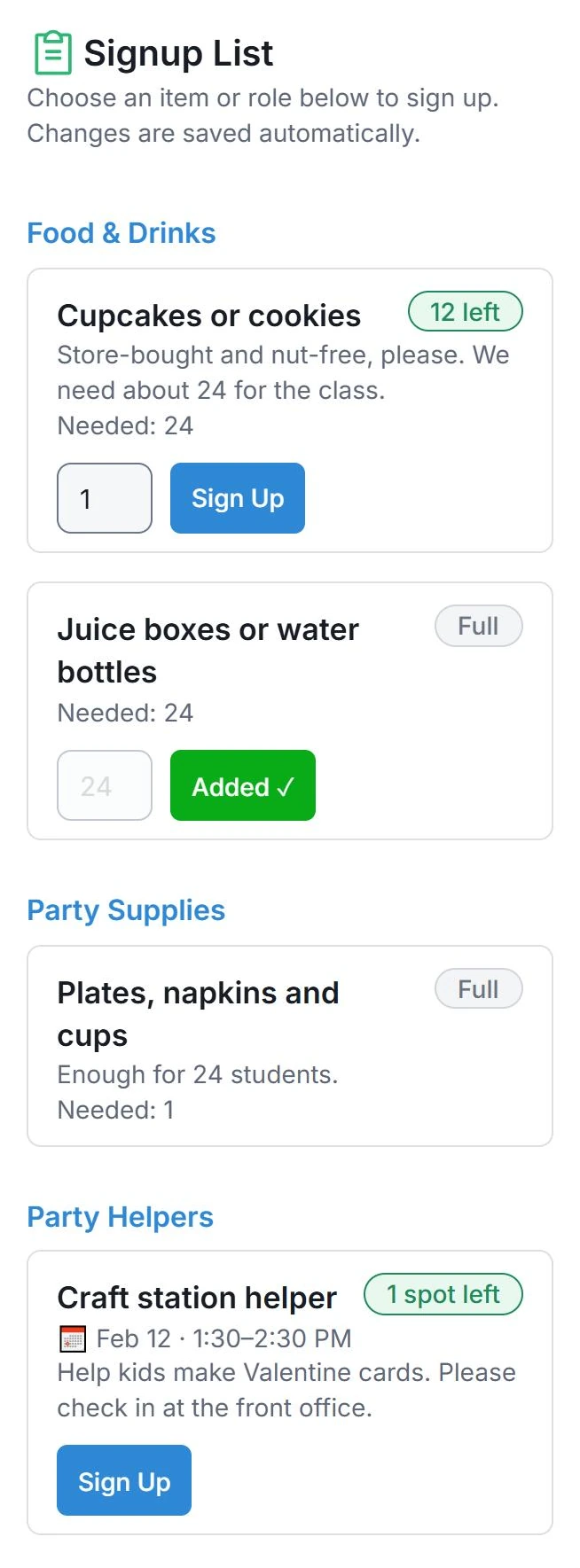
Parents open your link on any phone or computer. They enter their name, email, and any required answer, like their child’s name, then tap Continue to Signups. For food and supply items, they type how many they’ll bring and tap Sign Up. The count updates right away, so the next parent sees “12 left” instead of 24. Once an item is covered, it shows Full and can’t be claimed again.
Each parent also gets an email with a personal link to view or change their signups. If plans change, they can remove an item, and it reopens for someone else. No accounts, app downloads, or ads.
Class party sign up sheet examples you can copy
Each example is written for a class of about 24. Adjust the numbers to your class size and the teacher’s plans.
✓ Halloween or fall class party
Food & Drinks: Pumpkin or Halloween cookies (24), Clementines or fruit cups (24), Juice boxes or water (24) · Party Supplies: Plates and napkins (1 set), Craft kit or coloring pages (1), Small prizes for games (24) · Party Helpers: Game station helper (2), Craft helper (2), Costume parade helper (1), Cleanup (1). If your school skips costumes, call it a fall party and swap in a harvest craft.
✓ Winter party
Food & Drinks: Cookies or muffins (24), Pretzels or popcorn (2 bags), Hot cocoa packets (24) · Party Supplies: Plates, napkins, and cups (1 set), Snowflake craft supplies (1), Small treat bags (24) · Party Helpers: Craft helper (2), Game leader (1), Cleanup (1). Many schools prefer “winter party” over a specific holiday, so check with the teacher.
✓ Valentine’s Day class party
Food & Drinks: Cupcakes or cookies (24), Fruit cups or a fruit tray (2), Juice boxes or water (24) · Party Supplies: Plates, napkins, and cups (1 set), Valentine card craft supplies (1) · Party Helpers: Craft station helper, 1:30–2:30 PM (2), Cleanup helper, 2:30–3:00 PM (1). Remind families in the description about the class list for valentines, if the teacher sends one.
✓ End-of-year class party
Food & Drinks: Popsicles or ice cream cups (24), Watermelon or a fruit tray (2), Water bottles (24) · Party Supplies: Sunscreen (1), Sidewalk chalk and bubbles (2), Teacher gift contribution card (1) · Party Helpers: Field games helper (3), Photographer (1), Cleanup (2). For a teacher gift, many room parents collect notes from each student instead of money.
Tips for a smoother class party
- Follow the school’s food rules exactly. If the class is nut-free or store-bought only, say so in the description and in each food item’s details. Ask the teacher, not other parents, about allergies.
- Use totals, not “bring a dozen.” “24 cupcakes” lets two families split it. “Bring cupcakes” can leave you with 60.
- Offer low-cost and no-cost ways to help. Napkins, a craft helper role, or cleanup let every family pitch in, whatever their budget or schedule.
- Keep helper roles small. Classrooms fill up fast. Two or three adults is usually plenty, so set Spots Needed to match what the teacher wants.
- Set a drop-off time. “Front office by 9:00 AM” keeps cupcakes from arriving mid-math lesson.
- Send one reminder a few days before. Check Signup Coverage first so you can ask for what’s still missing. Paid SameTeam plans can send email reminders to everyone who signed up.
Reuse your sign up sheet for every party this year
Most classes have three to five parties a year, and the lists look a lot alike. Instead of starting over, paid SameTeam plans let you duplicate the whole event, then update the title, date, and a few items for the next party. Within a single event, the duplicate icon on each item is a quick way to add similar items, like a second helper shift at a different time.
Class party sign up sheet options compared
| Paper sheet or group text | Online sign up sheet (SameTeam) | |
|---|---|---|
| Who can sign up | Whoever sees it first | Every family, from one link |
| Splitting food items | Hard to track | Parents choose how many, and the total updates |
| Overbooking | Common | Items close when full |
| Helper times | Written in by hand | Each role has its own time |
| Seeing what’s missing | Count by hand | Signup Coverage shows what’s still needed |
| Changes and cancellations | Text the room parent | Parents update from their personal link |
Prefer a free form tool? Our Google Forms sign up sheet guide explains how to set one up and where it falls short for item limits.
Set up your class party sign up sheet in minutes
Add your treats, supplies, and helper roles, then share one link with families. Your first SameTeam event is free.
Create Your First Event Free →
No parent accounts · No app downloads · No ads
Frequently asked questions about class party sign up sheets
What should I put on a class party sign up sheet?
Start with three groups: food and drinks (a treat, a fruit or veggie option, and drinks), party supplies (plates, napkins, cups, and craft materials), and party helpers (crafts, games, and cleanup). Enter totals based on class size, and check the school’s food rules before you share.
How do I let parents split an item, like 24 cupcakes?
Enter the total in Number Needed and leave One person per spot unchecked. Each parent types how many they’ll bring, and the sign up sheet shows how many are still needed until the item is full.
How do I limit the number of parent helpers?
Check One person per spot on the helper role and set Spots Needed to the number the teacher wants. Once those spots are taken, the role shows Full.
Can I collect each student’s name?
Yes. Add a required guest question like “Your child’s name.” Parents answer when they sign up, and only you see the answers, in guest details or in the spreadsheet download (CSV).
Do parents need an account or an app?
No. Parents sign up in their web browser with their name and email. There’s no account to create, no app to download, and no ads.
Can I add a family who signed up on paper or by text?
Yes. On your Responses page, use Add Guest to add a family yourself and assign what they’re bringing, so your coverage stays accurate.
Is there a free class party sign up sheet?
Your first SameTeam event is free, including categories, quantities, helper times, and sharing. To keep creating events, like the rest of the year’s parties, you’ll need a paid plan, starting at $12/month, billed annually. Paid plans also include email reminders and duplicating events.
Bottom line: A good class party sign up sheet lists exactly what the class needs, lets families split the big items, and shows you what’s still missing. Set it up once, and you’ll spend party day enjoying the kids instead of counting juice boxes.
Planning more for your school? See our PTA signup tool guide, how to make a sign up sheet with time slots, and how to create an online sign-up sheet. Hosting a bigger event? Try our trunk or treat sign up sheet or Christmas volunteer sign up sheet guides, or create your first SameTeam event free →