Subsplash Alternative for Church Event Signups: When a Simple Signup Tool Makes More Sense
Subsplash is a powerful all-in-one church platform. But for potlucks, volunteer needs, supplies, and other practical church events, a focused signup tool can sometimes make coordination simpler.
Quick answer: If your church already uses and loves Subsplash, you may not need to replace it at all. Subsplash is built for a much broader church technology ecosystem, including apps, websites, giving, media, communication, and event registration. SameTeam is a focused event-planning tool for organizers who want to collect RSVPs and coordinate volunteer roles, potluck items, supplies, or other signup needs in one simple link. It is also designed to be easy for ministry leaders and volunteers to pick up with very little to learn. The two tools can serve different purposes — and can work alongside each other.
If you’re searching for a Subsplash alternative for church event signups, you may not actually be looking for an alternative to everything Subsplash does.
You may simply be planning a church picnic, potluck, volunteer day, ministry gathering, classroom event, outreach project, or other event where you need to answer practical questions like:
- Who’s coming?
- How many people are attending?
- What food or supplies are still needed?
- Which volunteer roles still need to be filled?
- How many signup spots are still available?
That’s an important distinction, because Subsplash and SameTeam are built for different scopes of work.
Subsplash is an established church technology platform with tools for mobile apps, websites, giving, media, communication, church management, groups, volunteer management, and events. Its event tools include free and paid registration, custom questions, attendee limits, ticketing, and payment features.
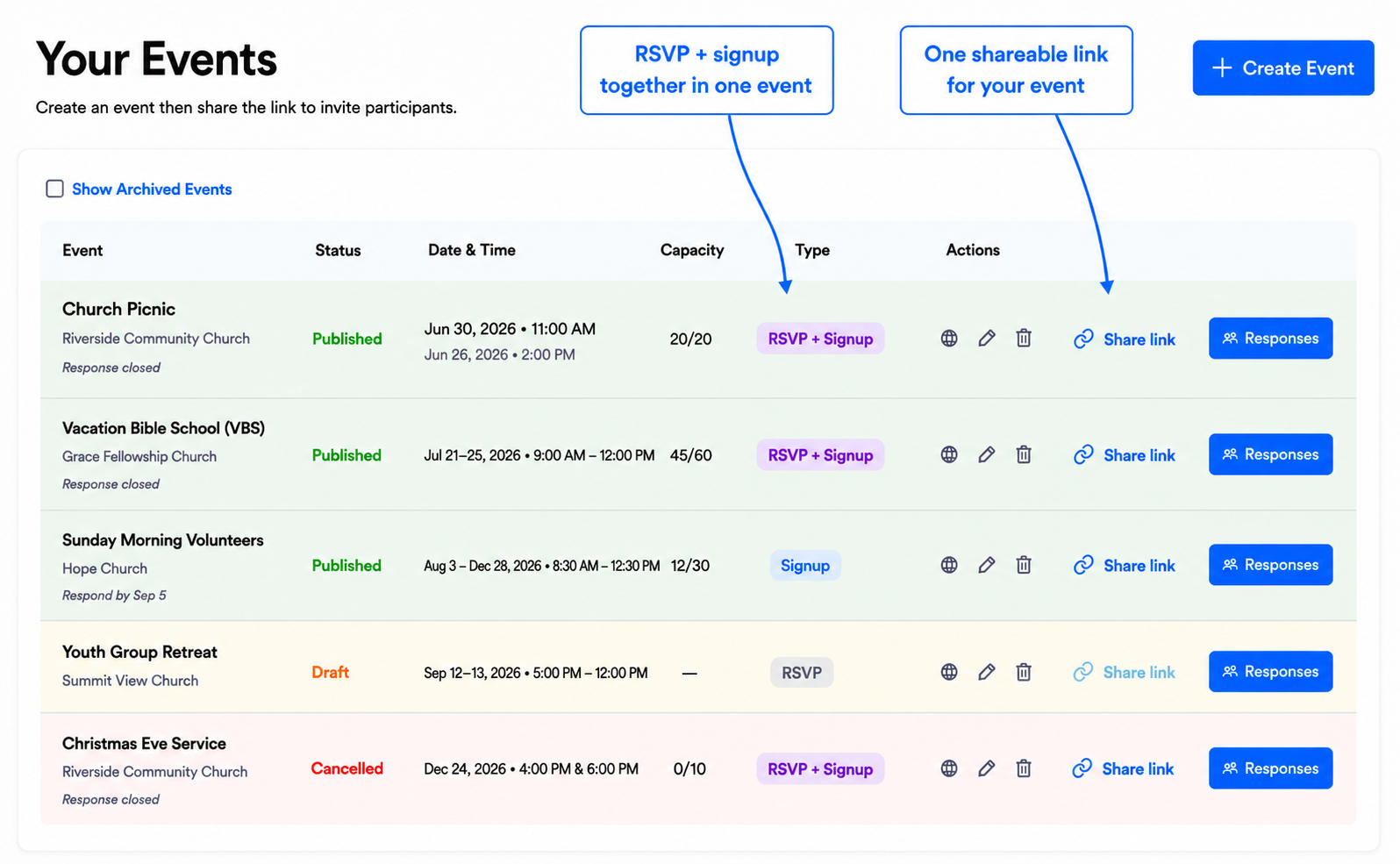
SameTeam is intentionally more focused. It is built around practical group-event coordination: create an event, add RSVPs and/or signup needs, share one link, and give participants a simple way to respond.
What Subsplash Does Well
Subsplash is much more than an event signup tool. It is designed as a broad digital platform for churches.
According to Subsplash, its platform includes church apps, websites, online giving, livestreaming and media, communication tools, church management features, groups, volunteer management, and event tools. For churches that want many parts of their digital ministry connected in one ecosystem, that breadth can be a major advantage.
Subsplash’s current event-management tools are also substantial. Churches can create free or paid event registrations, ask custom registration questions, set attendee limits, offer different ticket types, accept payments, and manage registration information from the church’s broader Subsplash environment.
Why Would a Church Use a Separate Event Signup Tool?
Because event registration and event coordination are not always the same thing.
A registration form is great when the main goal is to collect information about attendees. You may need names, contact details, ticket choices, payment, or answers to custom questions.
But many everyday church events have a different challenge: the organizer needs the group to help fill specific needs.
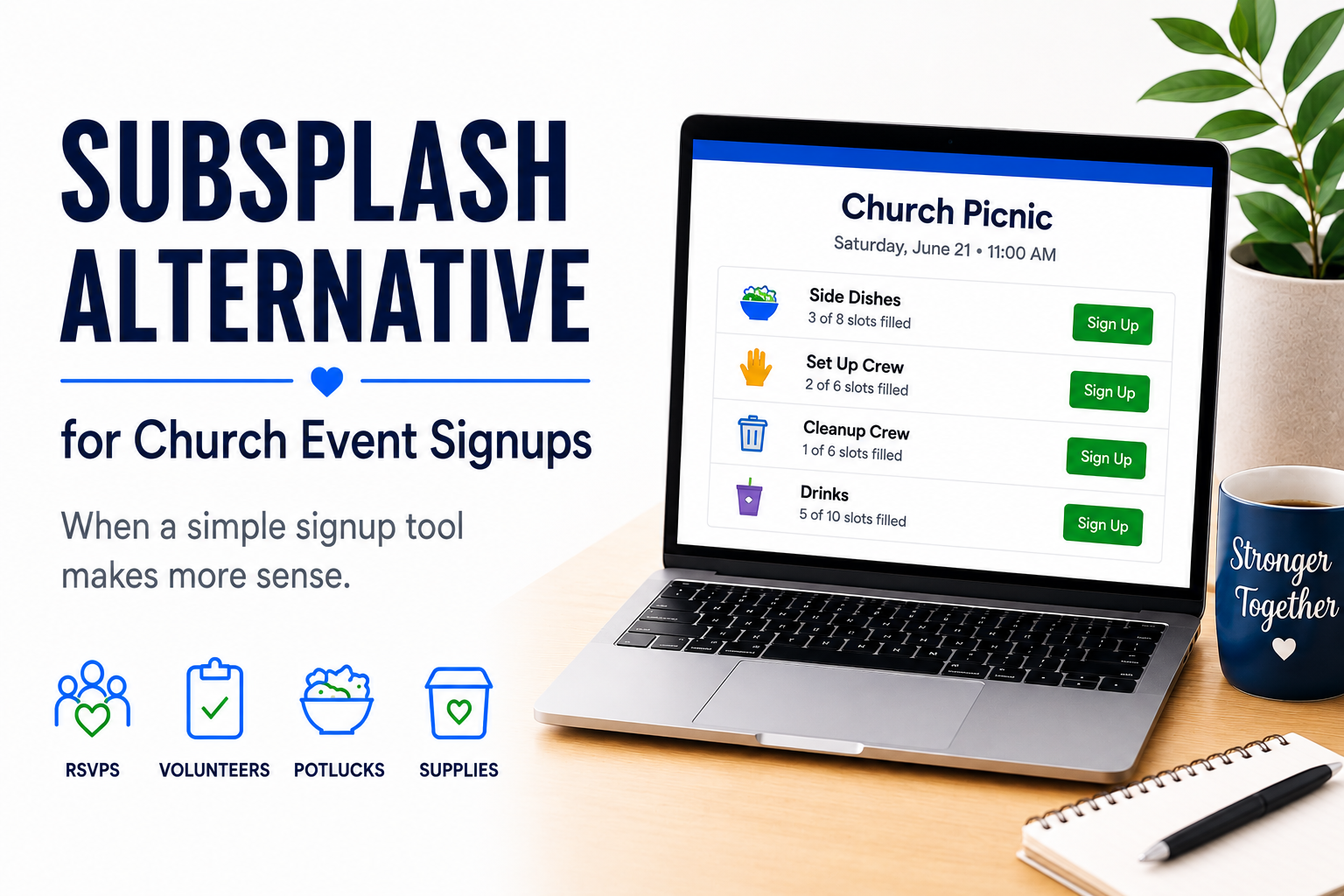
Imagine a church picnic. The organizer may need:
- 5 side dishes
- 4 desserts
- 3 cases of bottled water
- 4 setup volunteers
- 2 cleanup volunteers
In that situation, it can be especially helpful for participants to see what is still needed before they choose. If four desserts are already covered, the next person can immediately see that dessert is full and choose something else.
That’s the type of workflow SameTeam is designed around.
Subsplash Alternative for Church Event Signups: Subsplash vs. SameTeam
| Feature / Use Case | Subsplash | SameTeam |
|---|---|---|
| Broad church technology platform | SubsplashYes — apps, websites, giving, media, ChMS, communication & more | SameTeamNo — intentionally focused on event planning |
| Free event registration | SubsplashYes | SameTeamYes |
| Paid event registration | SubsplashYes | SameTeamNo |
| Attendee / event capacity limits | SubsplashYes | SameTeamYes |
| Custom registration questions | SubsplashYes | SameTeamFocused event fields and signup details rather than a general form builder |
| RSVP responses | SubsplashRegistration-focused | SameTeamYes — Yes / No / Maybe |
| RSVP + signup needs in one event | SubsplashMay be handled through the broader event / volunteer tools | SameTeamYes — a core workflow |
| Quantity-based signup items | SubsplashNot presented as the primary registration workflow | SameTeamYes — show remaining / full status |
| Potluck items and supplies | SubsplashCan be collected with registration questions | SameTeamYes — built as signup needs participants can select |
| Volunteer roles / signup spots | SubsplashYes — volunteer management is available in the broader platform | SameTeamYes — within the event signup itself |
| Response deadline | SubsplashEvent registration controls are available | SameTeamYes — organizers can set a response deadline |
| Email event reminders | SubsplashCommunication tools available within the broader Subsplash platform | SameTeamYes — organizers can send reminders to participating guests directly from the event dashboard |
| Guest app download required for a SameTeam signup | SubsplashNot applicable | SameTeamNo |
| Designed for event organizers | SubsplashPart of a broader church technology platform | SameTeamYes — focused setup with very little to learn |
| Guest SameTeam account required | SubsplashNot applicable | SameTeamNo |
| Advertising in SameTeam event experience | SubsplashNot applicable | SameTeamNone — guests or organizers |
The biggest difference is not the number of features. It is the purpose of the product.
Subsplash is designed to help a church run a connected digital ministry. SameTeam is designed to help an organizer coordinate a specific group event with as little friction as possible — including ministry leaders and volunteers who may not use the church’s main software every day.
When Subsplash May Be the Better Fit
Best when the event belongs inside a broader church technology ecosystem or needs more traditional registration and payment functionality.
- Your church already uses Subsplash and wants registration connected to its existing platform.
- You need paid event registration or multiple ticket types.
- You need detailed custom registration questions.
- You want event information connected with your church app, website, giving, people data, or other Subsplash tools.
- Your event is more like a conference, camp, retreat, or ticketed registration.
- You only need a quick RSVP and signup list for one event.
- The main challenge is showing participants exactly which food, supply, or volunteer needs are still open.
- A ministry leader wants to create and share a standalone event without changing the church’s broader technology setup.
When SameTeam May Be the Better Fit
Best for practical church events where RSVPs, volunteer spots, food, supplies, or other signup needs need to work together.
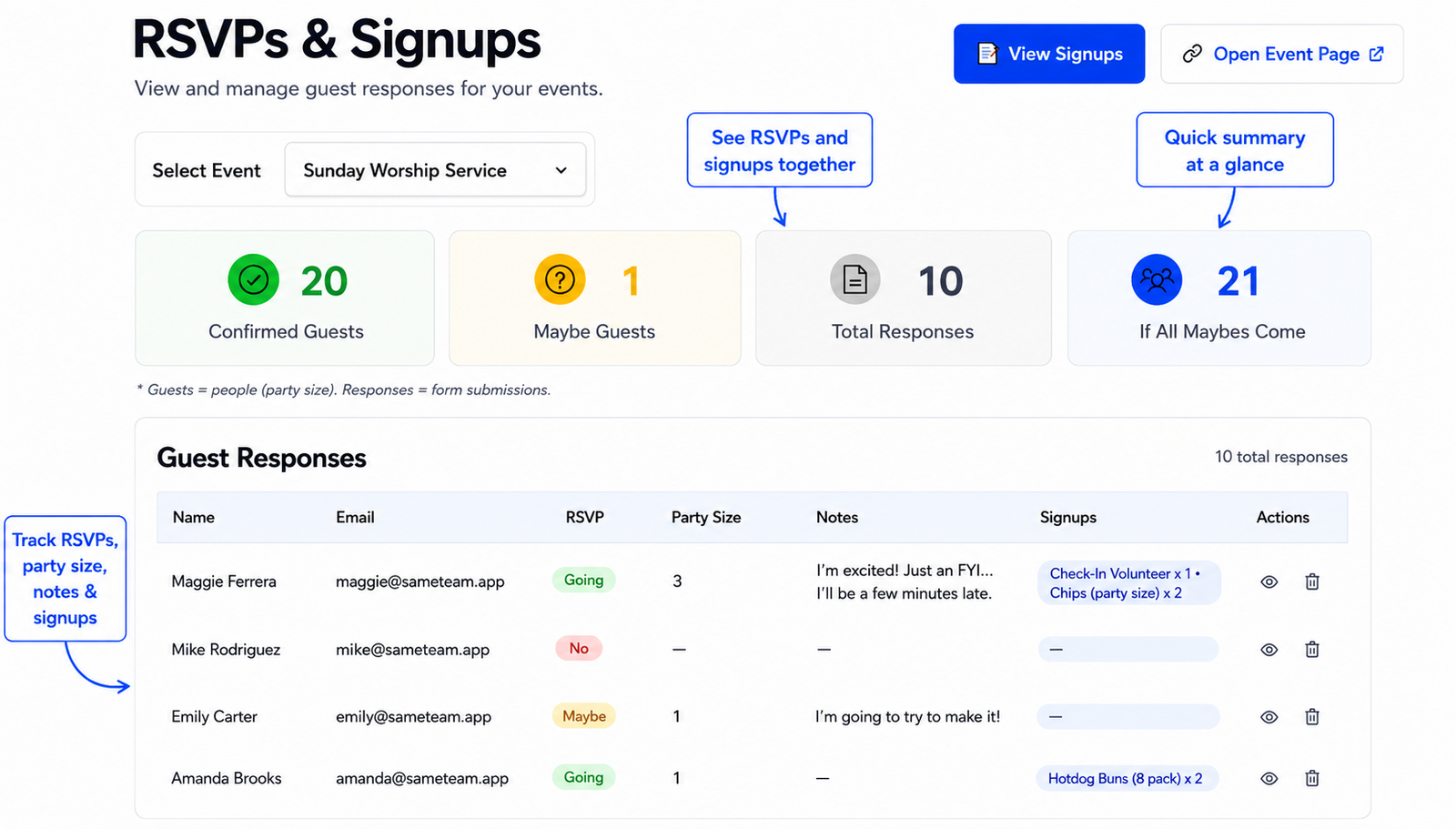
SameTeam is built for the organizer who wants to create an event, share one link, and immediately see both attendance and signup coverage.
An event can be RSVP only, signup only, or RSVP + signup. Organizers can add capacity limits and response deadlines, while participants can see remaining availability for signup needs as the event fills up.
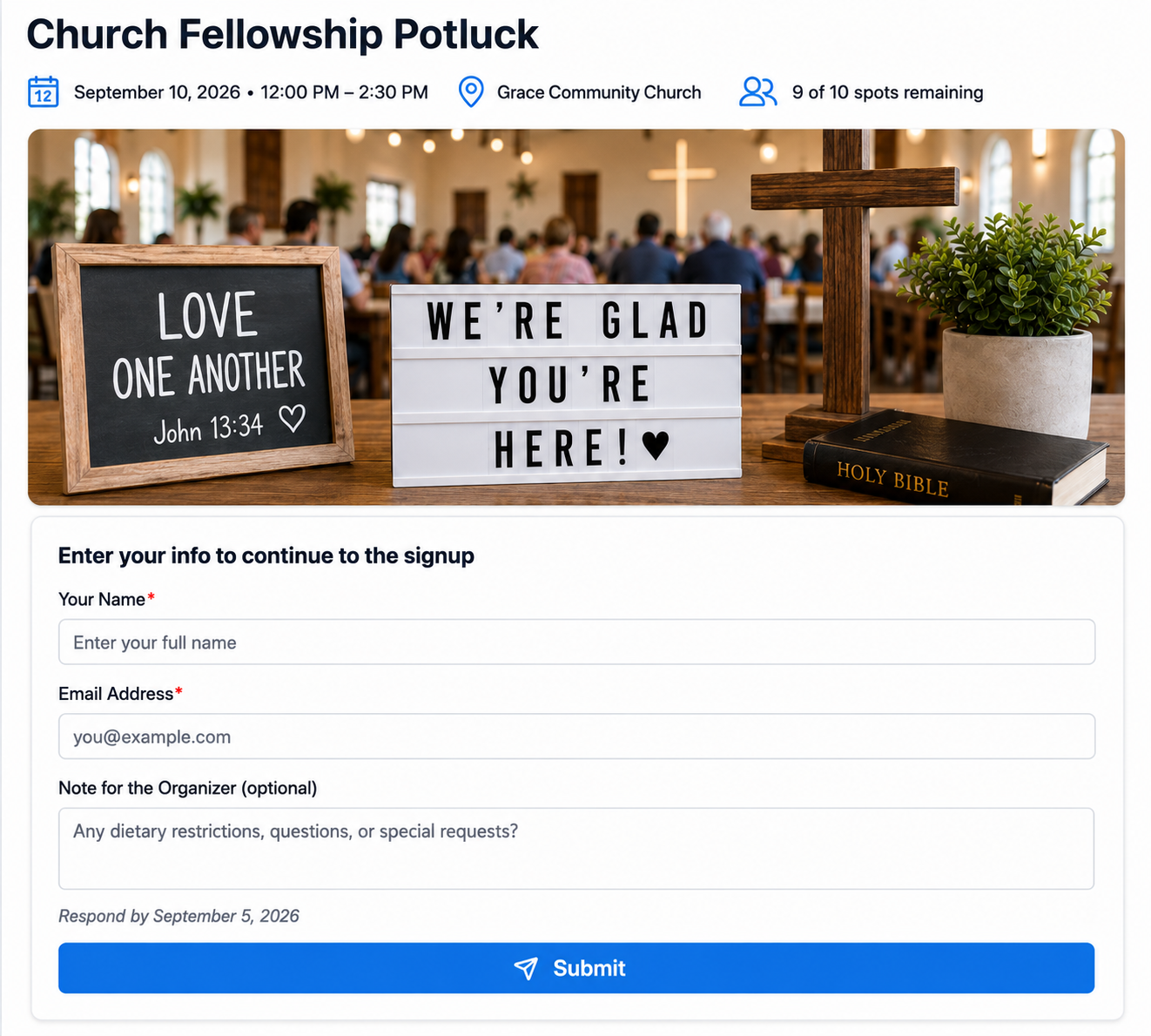
Sharing is designed to be simple too. Organizers can share one event link or use a QR code on church bulletins, announcement slides, flyers, or signs. Participants can respond without creating a SameTeam account or downloading an app, then return to their personal event page to see or edit their own signups. They can also leave notes for the organizer right within the event and add the event to their calendar, while organizers can keep responses, signup coverage, and participant notes together in one dashboard.
Organizers can also send email reminders directly from the event dashboard to people participating in the event. That means a ministry leader can coordinate the event, track responses and signup needs, and send reminders without having to build a separate email list.
- You want RSVPs and signup needs in one event.
- You need quantity-based items or roles with remaining availability.
- You are coordinating a potluck, supplies, volunteer roles, shifts, or a combination of needs.
- You want to set an overall event capacity.
- You want a response deadline.
- You want to send email reminders to participating guests directly from the event dashboard.
- You want ministry leaders or volunteers to be able to create events without learning a larger church-management platform.
- You want participants to respond without creating a SameTeam account or downloading an app.
- You want an ad-free experience for both organizers and participants.
- You want participants to be able to view and edit their own signups without asking the organizer to make changes.
- You want a QR code you can put on church bulletins, announcement slides, flyers, or signs for easy event sharing.
- You need paid ticketing or installment payments.
- You need a full church management system.
- You want one platform to power your church app, giving, media, website, and congregation database.
SameTeam is also designed to be affordable for organizations that don’t need a full church technology platform. Your first event is free. If you need more events, paid plans start at $15 per month with unlimited events, all the essentials, and no ads.
Create your first SameTeam event free. No guest accounts, no app downloads, and no ads.
Built for the People Actually Planning the Event
Many churches already have powerful software in place — but the people organizing individual events are not always the same people who manage the church’s technology.
A children’s ministry leader may be coordinating a volunteer breakfast. A small-group leader may be planning a potluck. A hospitality volunteer may be organizing a church picnic. A parent volunteer may be helping with VBS. These organizers may only need to coordinate one event, and they may not need access to — or want to learn — a larger church-management platform just to do it.
SameTeam is designed to keep that learning curve small. Create the event, choose whether you need RSVPs, signups, or both, add the event details and signup needs, and share the link. As responses come in, the organizer can track attendance and signup coverage from one dashboard and send email reminders to participating guests when needed. There is very little for an organizer to learn before getting started.
The participant experience is intentionally simple too. Guests can open the shared link, respond, and choose available signup items or roles without creating a SameTeam account or downloading an app.
Can SameTeam Work Alongside Subsplash?
Yes. In many cases, that may be the most useful way to think about the two platforms.
A church does not have to replace its existing church software just because one ministry needs a different signup workflow for a particular event.
If your church already uses Subsplash for its app, website, giving, communication, or other church-wide needs, an organizer can create a SameTeam event and share the SameTeam link wherever the church normally shares event information.
That leads to a simple philosophy:
Keep your church software. Simplify your events. Let your church-wide platform handle the big picture, and give ministry leaders and volunteers a focused tool for the events they are responsible for — whether they need RSVPs, volunteer spots, potluck items, supplies, or a combination of them.
Which Tool Makes Sense for Different Church Events?
| Church Event | What You Need | Likely Best Fit |
|---|---|---|
| Church conference | What you needPaid tickets, multiple registration types, payments, attendee information | Best fitSubsplash |
| Church picnic | What you needRSVPs + side dishes + desserts + drinks + setup / cleanup helpers | Best fitSameTeam |
| Youth camp registration | What you needDetailed registrant information, tickets / payments, broader church records | Best fitSubsplash |
| VBS volunteer signup | What you needCrew leaders, check-in helpers, snack volunteers, setup roles | Best fitSameTeam |
| Small-group potluck | What you needWho is coming + what everyone is bringing | Best fitSameTeam |
| Paid retreat | What you needRegistration, payments, ticket types, attendee details | Best fitSubsplash |
| Church workday | What you needRSVPs + volunteer jobs + tools / supplies needed | Best fitSameTeam |
These aren’t hard rules. A church can configure software in many different ways. The point is simply that different event types create different coordination problems.
Frequently Asked Questions
Is SameTeam a complete alternative to Subsplash?
No. SameTeam is not intended to replace Subsplash as a church technology platform. Subsplash offers a much broader ecosystem that can include church apps, websites, giving, media, church management, communication, groups, volunteer management, and event registration. SameTeam is focused specifically on practical event coordination.
Can I use SameTeam if my church already uses Subsplash?
Yes. SameTeam events are shared through a link, so a church or ministry leader can use a SameTeam link for a specific event while continuing to use Subsplash for the church’s broader technology needs.
Can ministry leaders and volunteers use SameTeam without learning our church management software?
Yes. SameTeam is a standalone event-planning tool designed to be simple for organizers. A ministry leader or volunteer can create an event, add RSVPs and/or signup needs, and share one link without needing to learn or manage the church’s broader technology platform.
Which is better for a church potluck: Subsplash or SameTeam?
If your priority is keeping everything inside your existing Subsplash ecosystem, Subsplash may work well. If your main challenge is coordinating RSVPs along with specific dishes, quantities, supplies, or volunteer needs — and letting people see what is still needed — SameTeam is purpose-built for that workflow. Learn more about online potluck signups with SameTeam.
Which is better for church volunteer signups?
It depends on the scope. Subsplash offers volunteer management within its broader church platform. SameTeam is useful for event-specific volunteer coordination when you want to combine roles or shifts with RSVPs, supplies, or other signup needs in one event. Explore SameTeam volunteer signup software.
Does SameTeam support event capacity limits?
Yes. Organizers can set an event capacity so they can control how many attendees can respond Yes while still collecting other RSVP responses.
Can SameTeam set an RSVP or signup deadline?
Yes. Organizers can set a response deadline for the event.
Do participants need a SameTeam account?
No. Participants can RSVP or sign up through the shared event link without creating a SameTeam account or downloading an app.
Is SameTeam free?
SameTeam lets organizers create their first event free. Paid plans start at $15 per month for additional events, with no ads.
Final Thoughts: Subsplash vs. SameTeam for Church Events
Subsplash and SameTeam do not need to be an either-or decision.
Subsplash is a strong option for churches that want a broad, connected technology platform spanning areas such as apps, websites, giving, communication, media, church management, volunteer management, and event registration.
SameTeam is built for a narrower problem: making everyday group events easier to coordinate — especially for the ministry leaders and volunteers who may be planning the event without managing the church’s larger software ecosystem.
If your church event needs RSVPs plus potluck items, volunteer roles, shifts, supplies, or other signup needs, SameTeam gives organizers one event and one simple link. Participants can see what’s still needed, respond without creating a SameTeam account, and avoid downloading another app.
For many churches, the best answer may be simple: keep the church software you already love, and give the people planning individual events a focused tool that’s easy to pick up and use.
Create your first SameTeam event free. Simple setup, no guest accounts, no app downloads, and no ads.
Disclosure: SameTeam is founded by the author and is featured in this comparison. Subsplash information is based on publicly available information from Subsplash available in August 2026. This article is intended to help organizers understand differences in product scope and event workflows, not to suggest that one platform is universally better than another. Features may change; verify current details with each provider before making a purchasing decision.