
Best Apps for Church Small Groups: Chat, Calendars, and RSVPs
Compare seven apps for church small groups, Bible studies, and life groups, plus how they differ from Bible study content apps and church management software.
Quick answer: The best app for a church small group is one that keeps your conversations, meeting schedule, and RSVPs in one private place. SameTeam Groups and BAND are strong all-around choices for invite-only groups that want chat, a shared calendar, and RSVPs. Church Center makes sense if your church already uses Planning Center. GroupMe, WhatsApp, Facebook Groups, and Signal work well for groups that mostly need to talk. For Bible study content itself, you’ll want a different kind of tool, such as YouVersion or RightNow Media.
Small groups, Bible studies, life groups, prayer groups, and fellowship groups all run on the same weekly rhythm: Where are we meeting this week? Who’s hosting? Who’s bringing dinner? Did everyone see the prayer update? When that information lives in a long group text, people miss things, and leaders spend their week answering the same questions.
This guide compares seven apps that help church small groups communicate and stay organized. It also explains how they differ from Bible study content apps and church management software, because searching for “small group apps” turns up all three, and they solve very different problems.
Full disclosure: SameTeam Groups is our app. We’ve included it because it was built for exactly this kind of group, and we’ve tried to describe every app, including ours, fairly. Features and prices were checked in November 2026 using each company’s website, help center, or app store listing. They can change, so confirm details before you commit.
First, decide which kind of app you need
“Small group app” can mean three different things. Many churches use one of each.
1. Group communication and scheduling apps (this guide). These help a group talk between meetings, keep a shared calendar, and know who’s coming. Examples include SameTeam Groups, BAND, GroupMe, and WhatsApp. They don’t provide Bible study lessons.
2. Bible study content apps. These provide what you study together. The free YouVersion Bible App offers Bible reading plans you can do with friends and a way to share prayers. RightNow Media is a streaming library of Bible study videos that churches subscribe to for their members, and its app includes a Groups feature for discussion and prayer requests. These are great for curriculum, but they aren’t built to run your group’s schedule, hosting, and RSVPs.
3. Church management systems (ChMS). Tools like Planning Center are run by church staff to manage people, groups, check-ins, giving, and more across the whole church. They’re usually chosen by the church, not by an individual group leader. Some include a member app, such as Church Center, which we cover below.
If you’re a group leader who wants your group to stop missing messages and meeting details, you’re looking for the first kind.
Church small group apps compared
| App | Best for | Chat | Events & RSVPs | Phone numbers private? | Cost |
|---|---|---|---|---|---|
| SameTeam Groups | Private small groups, Bible studies, life groups, ministry teams | Yes | Yes, with spot limits | Yes; no phone number needed to sign up | Free with ads; optional upgrades |
| BAND | Larger ministries that want posts, polls, and many tools | Yes | Yes | Yes | Free with ads; optional purchases |
| GroupMe | Chat-first groups, such as young adult and college groups | Yes | Yes | Yes, but a number is needed to sign up | Free |
| Church Center | Churches that already use Planning Center | Yes, if enabled | Yes | Managed by your church | Free app; church pays for Groups beyond 15 members |
| Groups already on WhatsApp, including international members | Yes | Yes | Usually visible in groups; usernames are rolling out | Free | |
| Facebook Groups | Groups that already spend time on Facebook | Yes | Yes | Uses your Facebook profile | Free, with Facebook ads |
| Signal | Privacy-focused groups that mostly chat | Yes | Polls only | Yes, hidden by default | Free |
“Yes” means the feature is part of the app’s standard experience. Checked November 2026.
What church small group leaders actually need
- A private, invitation-only space. Small groups share personal updates and prayer needs, so the group shouldn’t be public or easy to stumble into.
- Phone number privacy. Newcomers may not want to hand their number to a group of near-strangers on day one.
- A shared calendar. Meeting nights, host homes, serving dates, and socials should be easy to find without scrolling through chat.
- RSVPs. Hosts need to know how many people to expect, and who’s bringing what.
- Simplicity. Your least tech-savvy member should be able to join and find the next meeting in a minute or two.
- A distraction-free experience. Check whether the free version shows ads and what it costs to remove them.
1. SameTeam Groups
Our app Best for: Private, ongoing groups that want chat, a shared calendar, and RSVPs together, such as small groups, Bible studies, life groups, prayer groups, and ministry teams.
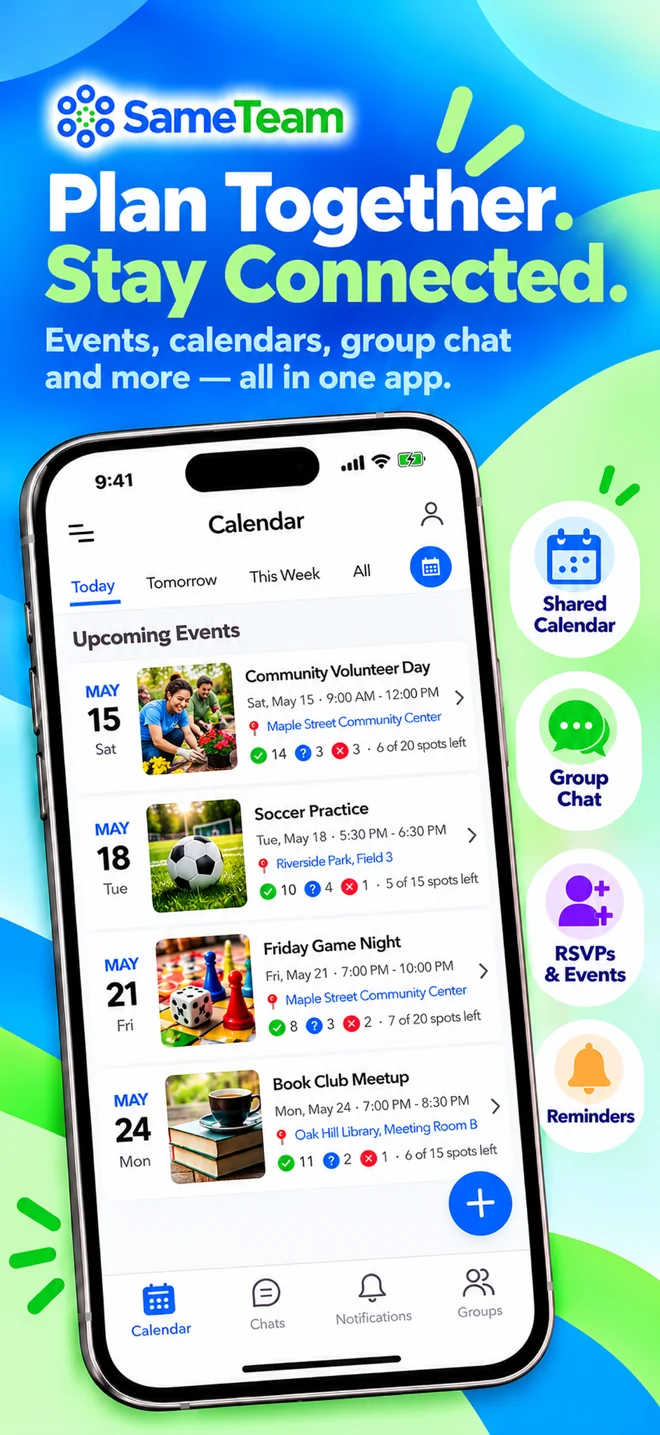
SameTeam Groups is a free iPhone and Android app for private groups. Members join by invitation, no phone number is required to sign up, and members chat without exchanging phone numbers. Each group gets its own chat, events, and shared calendar. When a leader or member posts an event with a date, time, place, and details, it appears on the group calendar, and members respond Yes, Maybe, or No. If an event has limited space, such as seats at a host’s table, rides to a retreat, or spots on a serving team, you can set a limit and see how many spots are still open.
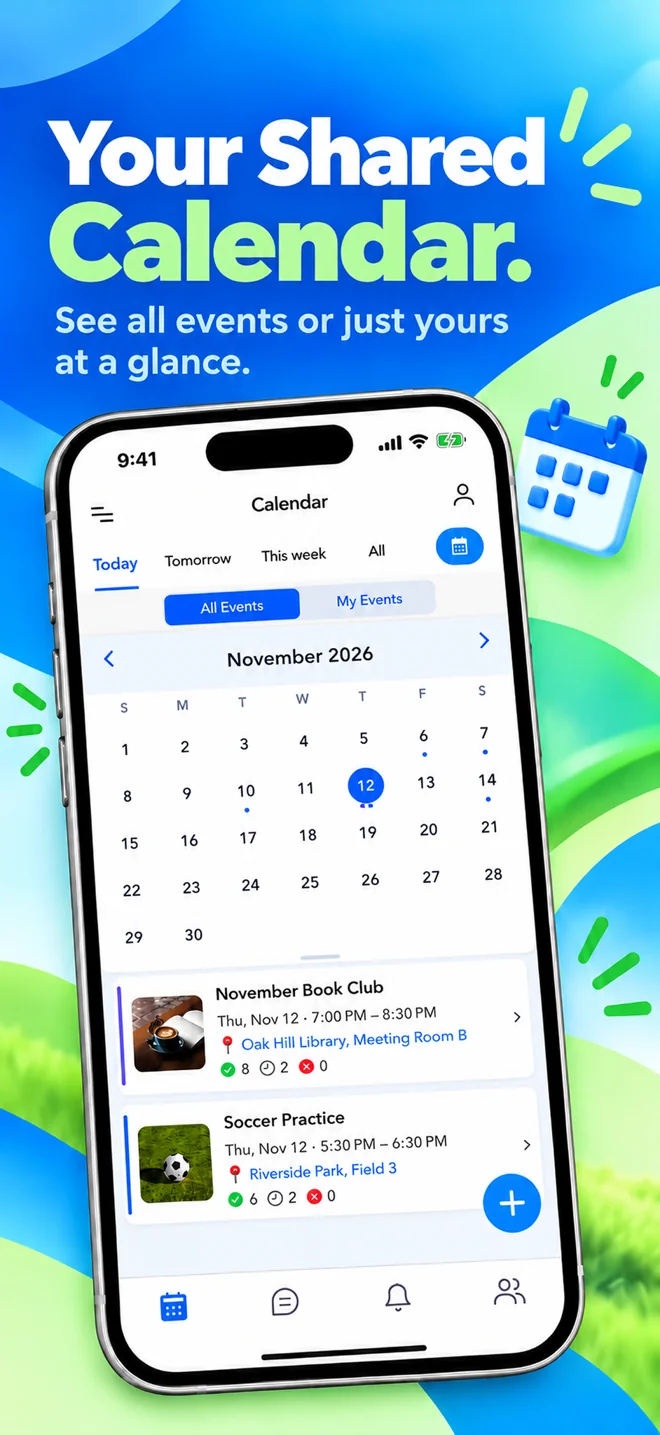
The calendar shows either all of your groups’ events or only the ones you’re attending, which helps if you’re in a small group and also serve on a ministry team. SameTeam Groups doesn’t include Bible study content, prayer-request tools, or church management features. It’s designed to keep a group connected and organized.
Highlights
- Private, invitation-based groups
- No phone number needed to sign up or chat
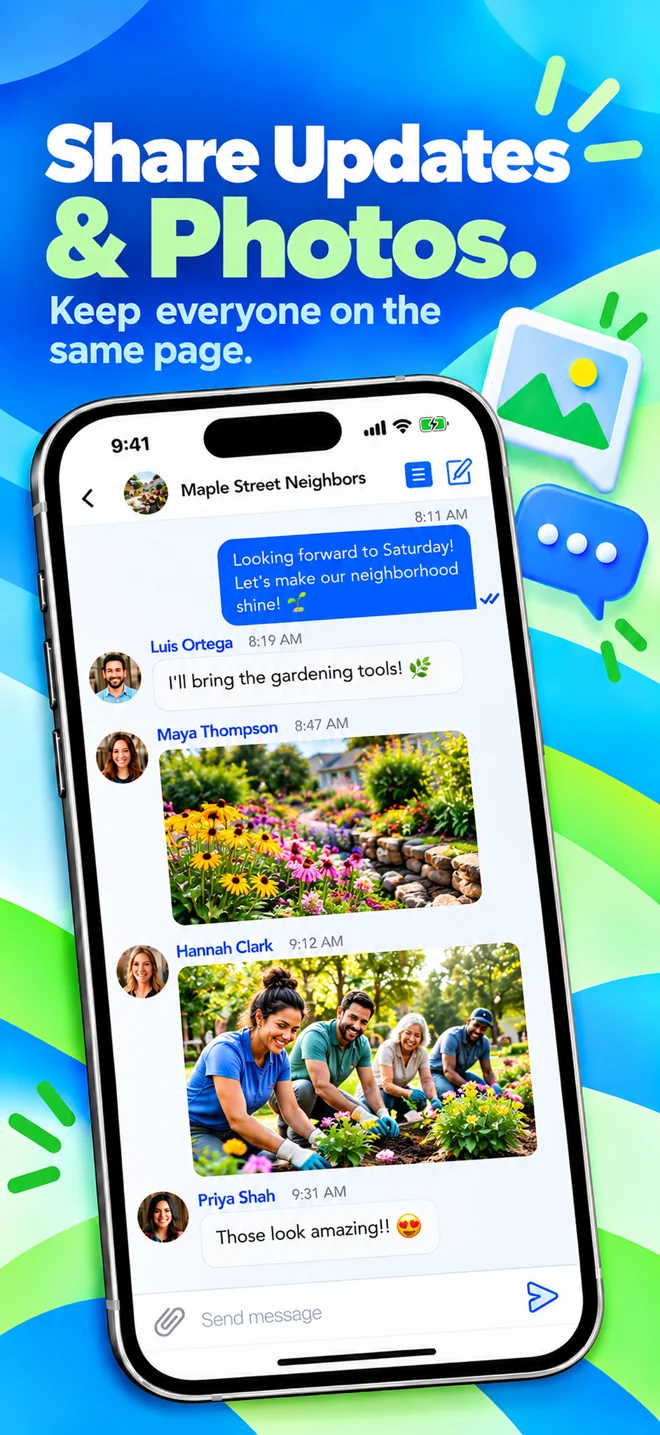
- Create group chats for different topics, like Bible study or a serving team
- Events with Yes / Maybe / No RSVPs and optional spot limits
- Shared calendar with All Events and My Events views
- Event reminders and change notifications
- Photo and file sharing in chat with the Attachments upgrade
Limitations
- The free version shows ads
- Sending photos and files in chat requires the optional Attachments upgrade
- No Bible study content or prayer-request tools
- Smaller community than BAND or GroupMe
- iPhone and Android apps only, so members need to install the app
Pricing: Free to download and use. Optional in-app upgrades, per person: Ad-Free ($9.99/year) and Attachments for sending photos and files in chat ($4.99/year).
SameTeam Groups vs. SameTeam Events: They’re separate products with separate accounts. SameTeam Groups is our mobile app for ongoing, private groups. SameTeam Events is our web platform for church event RSVPs, signup sheets, potlucks, and volunteer scheduling, where guests respond from a link without creating an account or downloading an app.
2. BAND
Best for: Larger ministries, such as women’s or men’s ministries and youth programs, that want an all-in-one group space with many tools.
BAND, made by NAVER, gives each group its own private space with a post board, group chat, and shared calendar. Announcements stay on the post board instead of scrolling away in chat. BAND also includes polls, to-do lists that can work as simple signup sheets, attendance check-ins, photo albums, read receipts, and live streaming. Leaders can assign co-leaders and limit who can post, comment, or start chats. It’s free for groups of any size and works on phones and the web.
Highlights
- Free for groups of any size
- Post board for announcements, separate from chat
- Calendar with RSVPs and reminders
- Polls, to-do lists, and attendance tools
- Phone, tablet, and web
Limitations
- Shows ads unless you buy ad-free time
- The feed and many tools can feel like a lot for a 10-person Bible study
- Works best when every member creates an account
Pricing: Free, with ads. Optional in-app purchases include a 30-day ad-free pass and extra storage.
3. GroupMe
Best for: Chat-first groups, especially young adult and college ministries, where many people already use it.
GroupMe, owned by Microsoft, is a free group messaging app with polls, events with RSVPs, recurring events, and a personal calendar of the events you’ve been invited to across your groups. Members’ phone numbers and email addresses stay private from the group, though everyone needs a phone number to sign up. In August 2026, GroupMe began winding down its two-way SMS option, so members now need the app or GroupMe on the web.
Highlights
- Free, with no premium tier
- Familiar, chat-first experience
- Events, RSVPs, recurring events, and polls
- Phone, web, and desktop
Limitations
- Meeting details and prayer updates can scroll out of view in a busy chat
- Fewer organizing tools than BAND
- A phone number is required to create an account
Pricing: Free. Optional extras, such as emoji packs, are sold in the app.
Deciding between these two? See our side-by-side GroupMe vs BAND comparison.
4. Church Center (Planning Center Groups)
Best for: Churches that already use Planning Center and want small groups connected to the church’s system.
Church Center is the free member app for churches that use Planning Center. With Planning Center Groups, members can find and join groups, sign up for group events, access group resources, and chat with their group, if the church has turned on chat. Group leaders can take attendance. Chat settings let leaders decide whether only leaders or all members can start conversations, and Planning Center excludes children under 13 from chat. Because it’s part of the church’s management system, it’s set up and paid for by the church, not by an individual group leader.
Highlights
- Connected to the church’s people and groups records
- Group events, attendance, and resources
- Group chat with leader controls
- Free app for members
Limitations
- Only available if your church uses Planning Center
- Set up and managed by church staff
- Larger churches pay for Groups as they grow
Pricing: The Church Center app is free. Planning Center Groups is free for up to 15 group members, with paid plans based on the number of people in groups.
5. WhatsApp
Best for: Groups where most members already use WhatsApp, including multilingual or international congregations.
WhatsApp is a free messaging app with group chats, polls, and events that members can RSVP to, with reminders for people who are going. Communities can group several chats together with an announcements channel. The main consideration for small groups is privacy: WhatsApp requires a phone number, and members of a group can usually see each other’s numbers. WhatsApp has announced optional usernames, designed to keep your number private from new contacts, which are rolling out gradually.
Highlights
- Free and widely used
- Events with RSVPs and reminders
- Polls and Communities for larger ministries
Limitations
- Phone numbers are generally visible to the group
- Plans and prayer updates mix into one chat stream
Pricing: Free.
6. Facebook Groups
Best for: Groups whose members already spend time on Facebook.
A private or hidden Facebook Group gives your small group a shared feed, events, and group chats, all inside Facebook. It’s free and familiar to many adults. The tradeoffs are that every member needs a Facebook account, the group sits alongside everything else on Facebook, including ads, and some members avoid Facebook entirely.
Highlights
- Free and familiar
- Private or hidden groups
- Events and group chats
Limitations
- Every member needs a Facebook account
- Shows ads, and the group competes with the rest of Facebook
- Not focused on group scheduling
Pricing: Free, with ads.
7. Signal
Best for: Privacy-focused groups that mainly need secure chat.
Signal is a free, end-to-end encrypted messaging app. Groups can have up to 1,000 members, join by link or QR code with optional admin approval, and create polls. Your phone number is hidden by default from people who don’t already have it saved. Signal doesn’t have events, RSVPs, or a shared calendar, so groups usually track meetings somewhere else.
Highlights
- Free, with strong privacy
- Phone number hidden by default
- Polls and invite links
Limitations
- No events, RSVPs, or calendar
- A phone number is needed to register
Pricing: Free.
Which app is best for your group?
Weekly Bible studies and life groups
Look for chat, a shared calendar, and RSVPs in one private place. SameTeam Groups keeps it simple for groups that meet regularly and rotate hosts or meals. BAND is a good fit if you also want a post board, polls, and more tools.
Prayer groups
Prayer requests are personal, so choose an invitation-only group and avoid anything public. Any of the private chat apps here can carry prayer updates. If your group also wants to keep personal prayer lists, the YouVersion Bible App has a prayer feature you can share with friends.
Fellowship groups and socials
For potlucks, game nights, and outings, RSVPs and spot limits help hosts plan. SameTeam Groups, BAND, GroupMe, and WhatsApp all support events with responses.
Churches already on Planning Center
Church Center keeps groups connected to your church’s records, attendance, and sign-ups. Ask your church office whether chat is turned on for your group type.
Young adult and college groups
GroupMe is familiar to many students and works well for fast-moving chat.
Privacy-first groups
Signal offers strong privacy for chat. If you also want a calendar and RSVPs without sharing phone numbers, consider SameTeam Groups.
Want a wider view beyond church groups? See our guide to the best apps for group communication and scheduling.
Frequently asked questions
What is the best app for church small groups?
It depends on what your group needs most. For chat, a shared calendar, and RSVPs in one private app, SameTeam Groups and BAND are strong choices. If your church uses Planning Center, Church Center connects groups to the church’s system. GroupMe and WhatsApp work well for chat-first groups.
What’s the difference between a Bible study app and a small group app?
Bible study apps, such as YouVersion and RightNow Media, provide content: Bible reading plans, videos, and study guides. Small group communication apps help your group talk, schedule meetings, and track who’s coming. Many groups use one of each.
Is there a free app for church small groups?
Yes. SameTeam Groups, BAND, GroupMe, WhatsApp, Facebook Groups, and Signal are all free to use. SameTeam Groups and BAND show ads in their free versions, with optional paid upgrades. Church Center is free for members, and Planning Center Groups is free for churches with up to 15 group members.
Can members keep their phone numbers private?
In SameTeam Groups, no phone number is required to sign up, and members chat without exchanging phone numbers. BAND and GroupMe also keep phone numbers private from the group, and Signal hides numbers by default. In WhatsApp, group members can usually see each other’s numbers, although optional usernames are rolling out.
Can we share prayer requests in these apps?
Yes, in any private group chat. None of the communication apps in this guide include a dedicated prayer-request tool. If you want shared prayer lists, the YouVersion Bible App and RightNow Media’s Groups feature include prayer features.
Do members need to download an app?
For the best experience, yes. SameTeam Groups is an iPhone and Android app. BAND, GroupMe, WhatsApp, Facebook, and Church Center also offer web or desktop access.
The bottom line
The right small group app is the one your group will actually use. Start by separating what you study from how you stay connected: use a Bible study app or curriculum for content, and a group communication app for conversations, meetings, and RSVPs. If your church runs on Planning Center, Church Center is a natural fit. If you want a simple, private place for your group’s chat, calendar, and RSVPs, SameTeam Groups is worth a try. It’s free on iPhone and Android.
SameTeam Groups
Keep your group on the same page
A free app for iPhone and Android. Create a private group, invite your people, and keep group chat, shared calendars, events, and RSVPs in one place. Optional in-app upgrades are available.

